From chat to watch: planning a training week with an AI assistant and Garmin
A step-by-step walk through one conversation: last week's review, today's readiness, next week's plan, and a 6×400 m session that waits for your yes before it goes anywhere near your calendar.
- AI-assisted, author-checked

From the conversation, through the calendar, to the watch. (AI-generated illustration)
Most Garmin athletes know the weekly planning routine. Open Garmin Connect, scroll through the last seven days, try to remember how the legs felt on Thursday, look at the HRV graph, decide what next week should be, and then build each session in the workout editor, step by step, dragging repeat blocks around.
I run, and I write software. I built Garmin MCP, an open-source server that lets an AI assistant read your Garmin Connect data and, when you ask, put structured workouts on your Garmin calendar. This article is the tutorial I would give a training partner: the whole routine as one conversation, with my own data from this week.
One thing up front, because it shapes everything below: nothing is written to your Garmin account until you have seen it and said yes. I'll show where that rule lives at the end.
Setup in one line
Garmin MCP works with Claude Code, Claude Desktop, Codex and any other client that speaks MCP. In Claude Code it is one command:
The first question that needs Garmin opens Garmin's own sign-in page in your browser. You sign in there, so your password never passes through the tool. Data is downloaded only when a question needs it and stays in a local database on your computer. The documentation has the setup for every other client.
You do not need to know any tool names. I mention them below so you can see what happens under the hood, but you just ask in your own words.
Step 1: look back at last week
I start with "Review my last week." The assistant calls get_period_summary, which returns the whole week in one answer: sessions and volume per sport, time in heart-rate zones, rest days, the longest and hardest session, sleep, resting heart rate and HRV averages, and Garmin's fitness and form numbers at the end of the week.
My week of 9 to 15 November was short to describe. One session: an hour of walking. Six rest days. A training load of 4. Sleep averaged 6.8 hours, resting heart rate 61 bpm, HRV 32 ms.
Tutorials usually skip weeks like that, but this is where a review earns its keep. One flat week looks harmless on its own. Next to the weeks before it, it is a clear break.
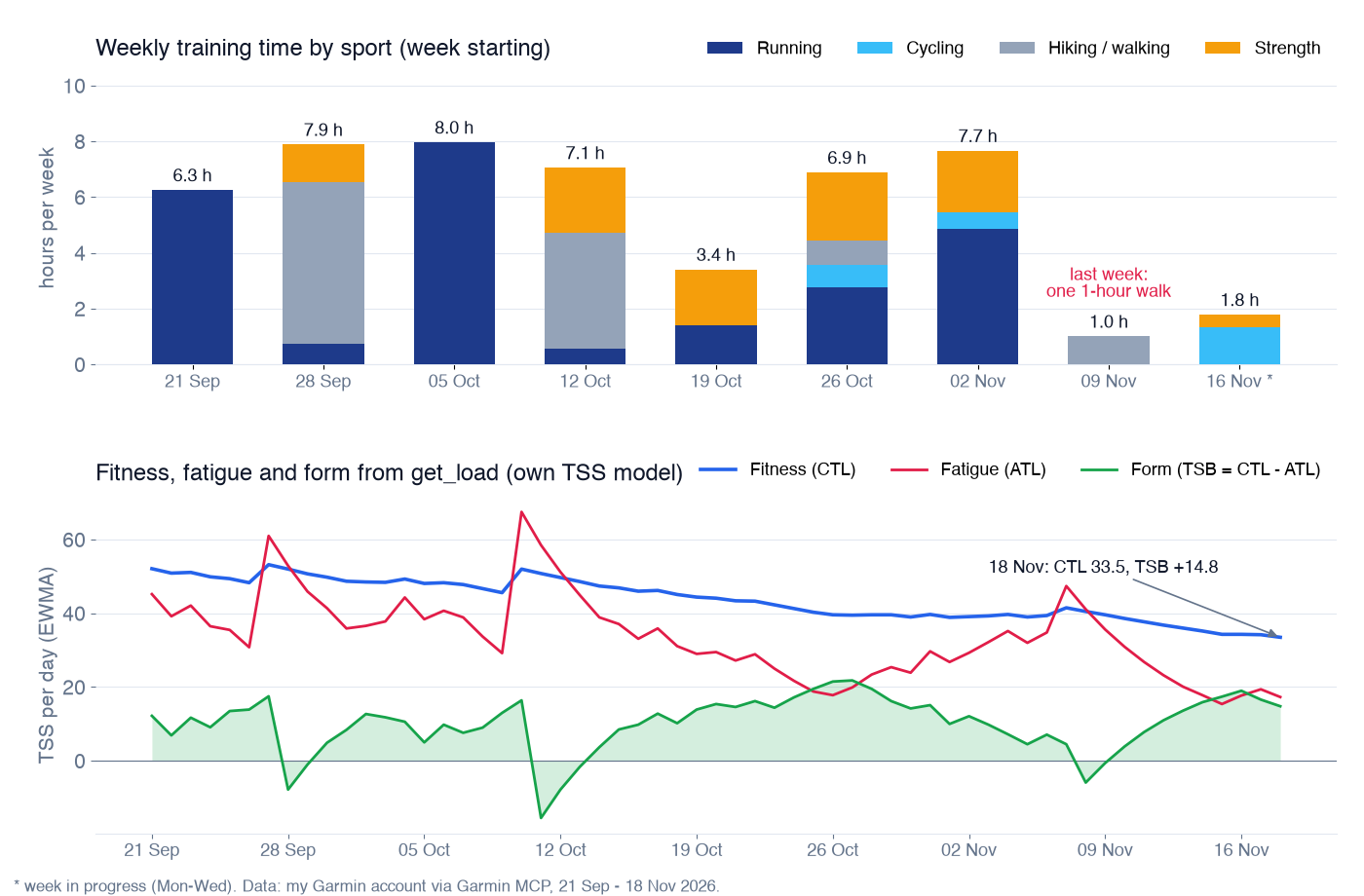
Nine weeks of my own data. Last week stands out, and fitness (CTL) has been drifting down since October. Chart drawn from get_load.
For the longer view I ask "How has my load changed since September?", which goes to get_load. That tool runs its own load model on your activities (TSS from power, pace or heart rate, with the thresholds that were valid on each date) and returns fitness, fatigue and form: CTL, ATL and TSB. On 18 November mine were CTL 33.5, ATL 17.3 and TSB +14.8. Fresh, and detrained a little.
A small warning that saves confusion later: the week summary shows the same three numbers computed from Garmin's own training load, and they are not the same. Garmin's version had my form at +31.3 at the end of last week. Both are useful; just compare like with like. The assistant says which model it used if you ask.
If you like a ready-made routine, the server ships a weekly_review prompt. Claude Code lists it as /mcp__garmin__weekly_review; it reviews volume, intensity, recovery and form, and finishes with a few questions about how the week felt.
Step 2: check form and readiness
Before planning anything hard I ask "Can I train hard today?" That goes to get_readiness, which makes a morning GO / MODIFY / REST call from four signals: HRV, resting heart rate, hours of sleep and training load, each compared with your own baseline. Garmin's Training Readiness, Body Battery and stress are shown next to it but not counted.
On Wednesday 18 November the answer was REST:
- HRV 28 ms, below my baseline range (low end 33 ms): red.
- Resting heart rate 64 bpm against a 28-day mean of 58.1: red.
- Sleep 6.6 hours: yellow.
- Load fine (ACWR 0.5, TSB +16.1): ok.
Two reds in a pair is what the default rules call REST, and every signal comes back with its value, reference and rule, so I can see why. The rules are overridable if your own thresholds differ.
These numbers are training information, not medical advice. For me they mean one practical thing: whatever I plan for Thursday, I check readiness again on Thursday morning before I do it.
Step 3: plan the week
Now the planning. You can just ask "Plan my next week", but the plan_next_week prompt does it more carefully. In Claude Code it is /mcp__garmin__plan_next_week, with two optional arguments: a goal and the days you have.
There is also a race to plan around. "When is my next race?" goes to list_workouts, which reads the races and events on my Garmin calendar: a 31 km race on 16 January 2027, 59 days away. The race_check prompt adds form and Garmin's race predictions to that, and what the remaining days should look like.
So I gave the prompt my goal (the 31 km race) and four days: Tuesday, Thursday, Saturday, Sunday. It reads the last two weeks, my training status and 14 days of HRV, sleep and resting heart rate, then proposes the week day by day with purpose, duration and intensity in heart-rate zones or pace.
This is what came back on Wednesday evening, trimmed:
- The read of the data. Load is low (TSB +27, Garmin's acute-to-chronic ratio 0.39), but recovery is poor: HRV low against my baseline, resting heart rate up from 55-58 to 61-66 bpm, sleep 6.1 hours on average with nights of 4.0 and 4.2 hours. "The fatigue looks like it comes from sleep and life stress, not from training volume."
- Tuesday: 45 minutes easy in zone 2, with 4 × 15-second strides.
- Thursday: 55 minutes with 2 × 10 minutes of light tempo at around 4:55-5:05 per km, but only if that morning HRV is balanced and resting heart rate 62 or lower. Otherwise an easy run.
- Saturday: rest, or 30-40 minutes of easy spinning or strength.
- Sunday: the long run and the key session, 1:30 to 1:40 in zone 2.
- In total about 30 km of running in roughly 3:15, with a rule to turn Thursday into an easy run if Tuesday's resting heart rate is 64 or higher or HRV is low again.
It ended with "Want me to create these as Garmin workouts? I'll show you the steps first."
What I like most is that the one quality session carries its own go/no-go rule, built from my readiness numbers. That is what a coach would say, and it is what I would forget on my own. One thing to watch: the form of +27 it quoted is Garmin's model, not the +14.8 from my own model above. Same warning as in step 1.
The important line in that prompt is the last one: do not create anything yet. The plan is text. Nothing exists in Garmin until I approve it, and then each session goes through the preview in the next step first.
If you follow a Garmin Coach plan or another training plan, list_workouts shows those workouts too, marked as coming from the plan, with the plan's phase and target race. The assistant can read them and plan around them, but it does not move or delete them; that stays in Garmin Connect or on the watch. I am not on a plan right now, so my list shows only my own library and the race.
Step 4: "Build me 6×400 m with 90 s rest for Thursday"
This is the part I built the whole workflow for. Any session from the plan goes the same way; I'll use the request from the project's demo, because a short interval session shows every part of a structured workout on one screen. I type one sentence, and the assistant calls create_workout with dry_run: true.
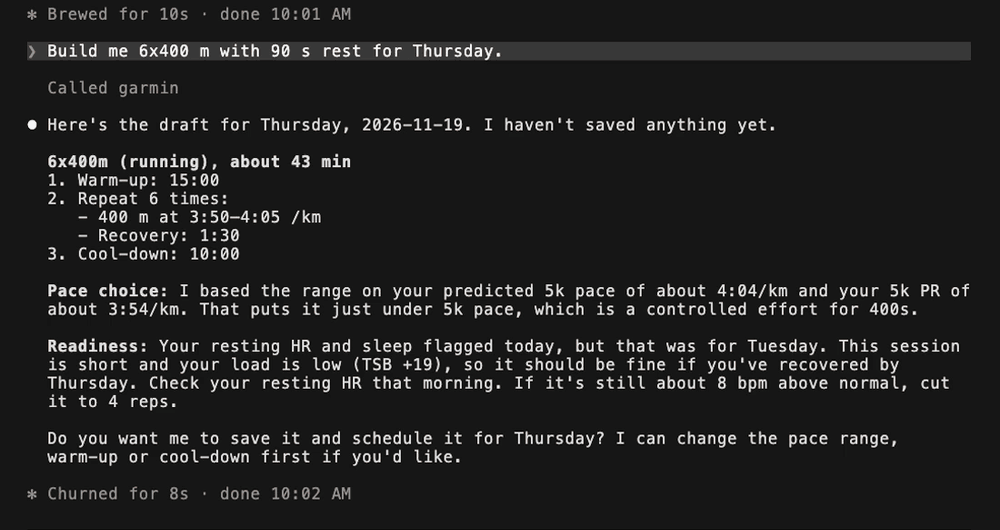
A real exchange in Claude Code, from the project's demo recording. "I haven't saved anything yet."
A dry run is computed entirely on your machine. It does not contact Garmin and saves nothing. It returns the readable steps, the estimated duration and a note telling the model to show this to you and wait. Here is the same request with the preset's defaults, as the tool returns it:
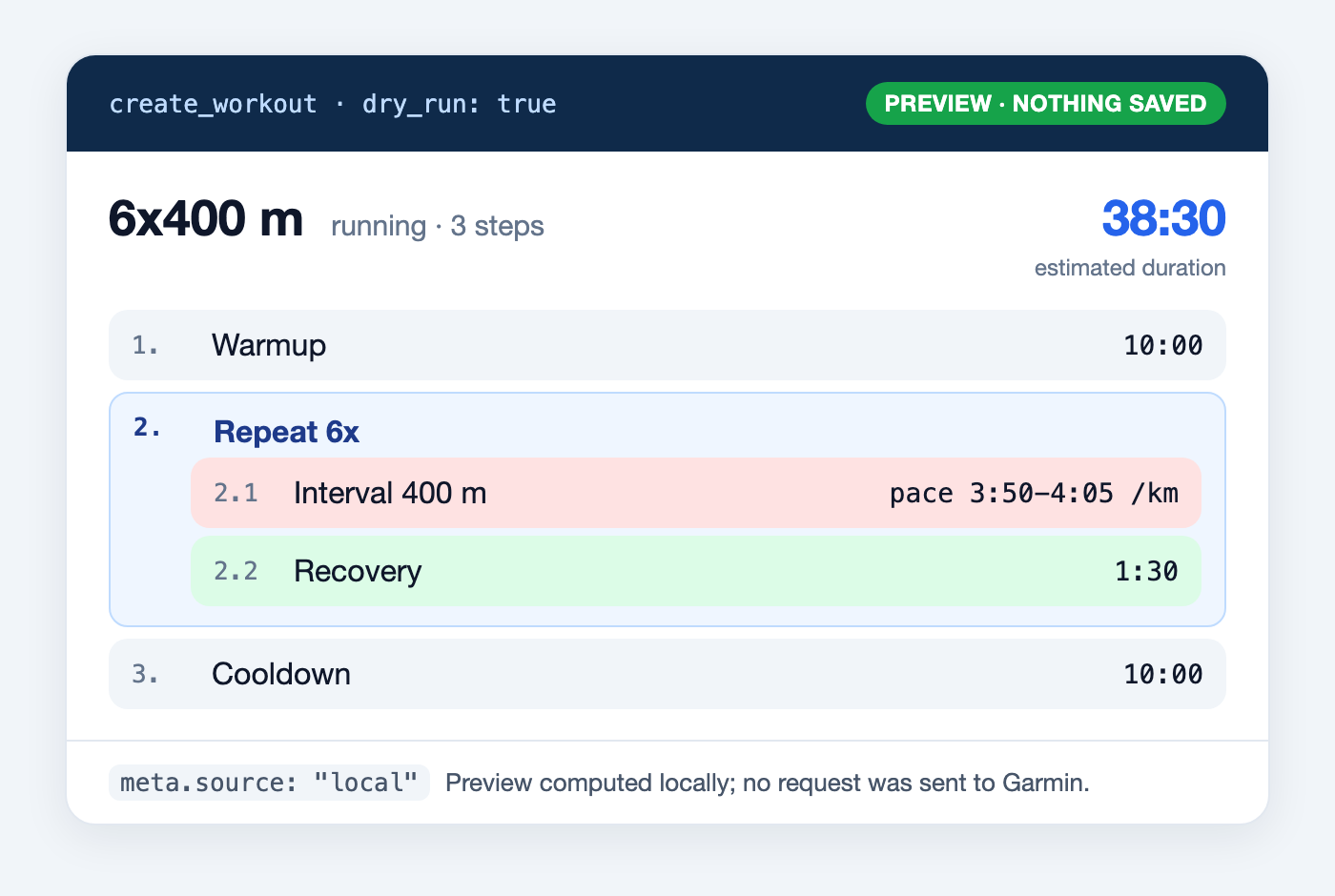
The dry-run result, drawn as a card. The step lines and the 38:30 estimate are the tool's own output.
Notice that the two drafts differ. In the recorded conversation the assistant chose a 15-minute warm-up and set the pace range from my predicted 5 km time; with the defaults the warm-up is 10 minutes and the estimate is 38:30. Neither is wrong. This is exactly why the preview exists: the model makes choices, and you should see them before they land on your wrist. "Make the warm-up 20 minutes" gives you a new preview, and still nothing is saved.
The estimate is simple and stated: time steps count as written, and distance steps count at the middle of their pace range. A 400 m repeat at 3:50 to 4:05 per km counts as about 95 seconds, so 10 + 6 × (1:35 + 1:30) + 10 makes 38:30.
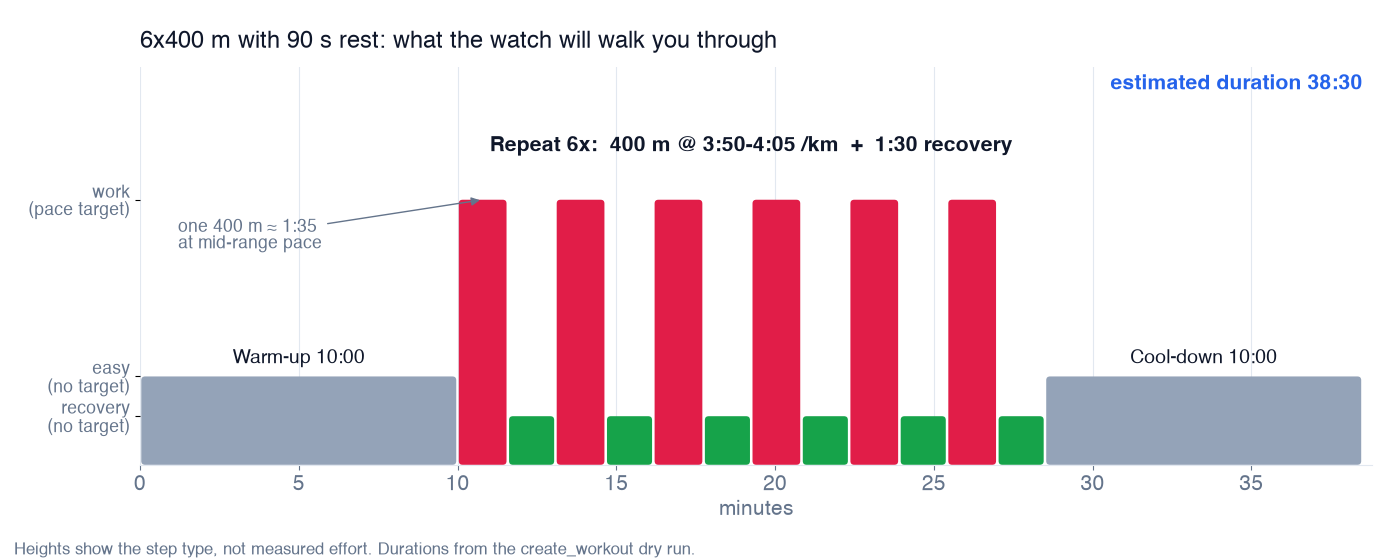
What the watch will walk me through. Heights show the type of step, not measured effort.
Targets are where structured workouts become useful on the watch. A step can carry a pace range, a heart-rate zone (Garmin's zones 1 to 5 from your profile), a heart-rate range in bpm, a power zone or power range in watts, or a cadence range. Steps can end on time, distance, reps, calories or the lap button, and repeats can be nested.
Presets: easy Z2, walk/run, strength circuit
Most of my week is not intervals. For the standard sessions there are four presets that need only a few parameters: run intervals, walk/run, an easy zone 2 session (running, walking or cycling) and a strength circuit. Anything else is written as typed steps.
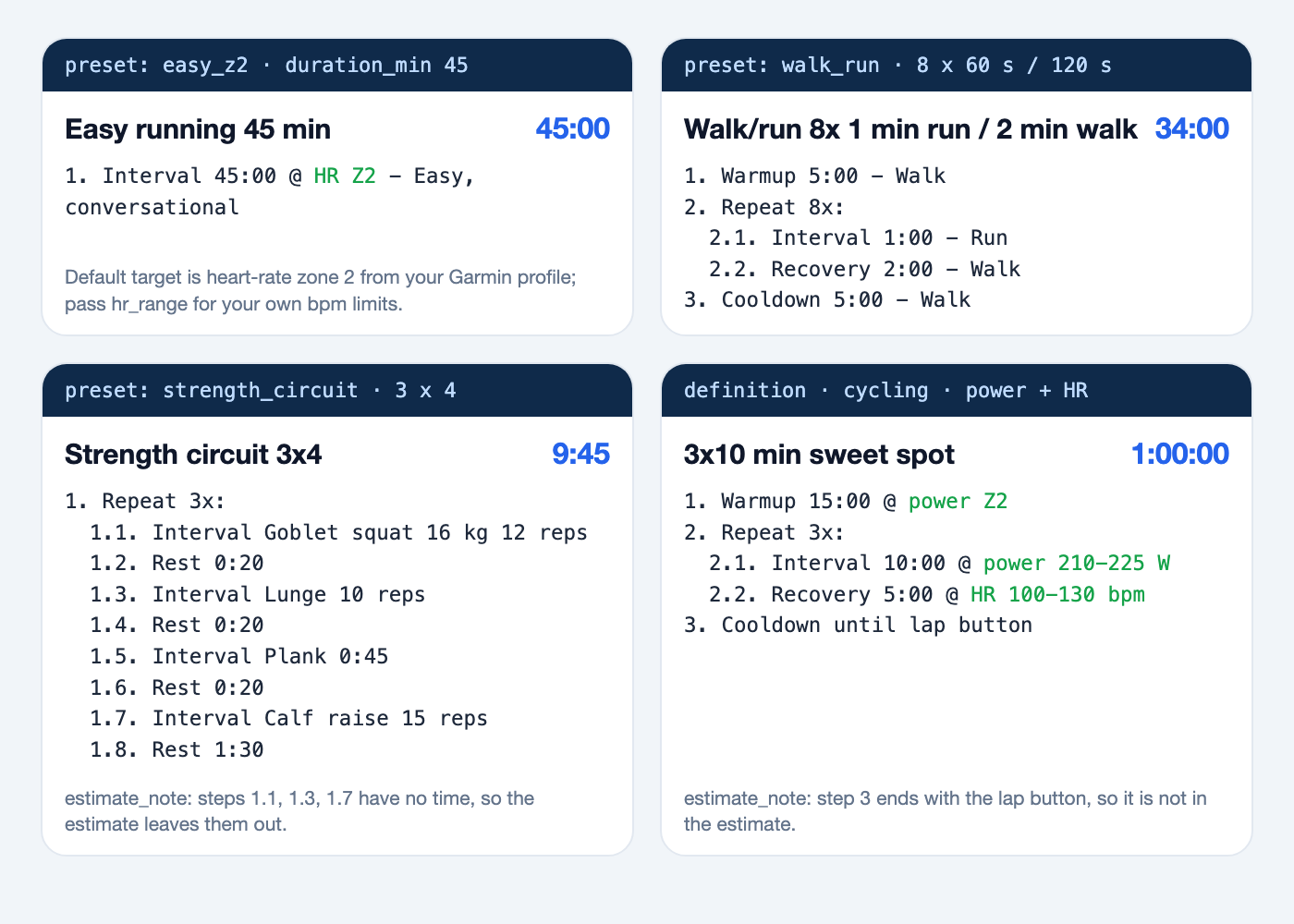
Three presets and one typed workout with power and heart-rate targets, all as dry runs. Nothing here was saved.
"An easy 45-minute zone 2 run for tomorrow" becomes one step at heart-rate zone 2. "A walk/run session for a beginner" becomes eight rounds of one minute running and two minutes walking. The strength circuit shows a detail I like: the estimate says 9:45 and admits that the steps counted in reps have no time, so they are left out. I would rather see that than a made-up number.
Step 5: yes, then calendar, then watch
When I say "Yes, save it and schedule it for Thursday," two things happen. create_workout runs again with the same input, this time without dry_run, and saves the workout to my Garmin library. Then schedule_workouts puts it on the calendar date. Moving a session to another day is one call, and "take it off the calendar" removes the calendar entry while the workout stays in the library.
From there Garmin Connect does what it always does: the next time the watch syncs, Thursday's workout is on it, with every step and target.

The last hop is Garmin's own sync between the calendar and the watch. (AI-generated illustration)
For this article I stopped at the preview: nothing above was saved to my account. The calendar and watch picture is an illustration, not a screenshot.
Nothing is saved without your yes
Here is the whole flow, and where the line sits between looking and writing.
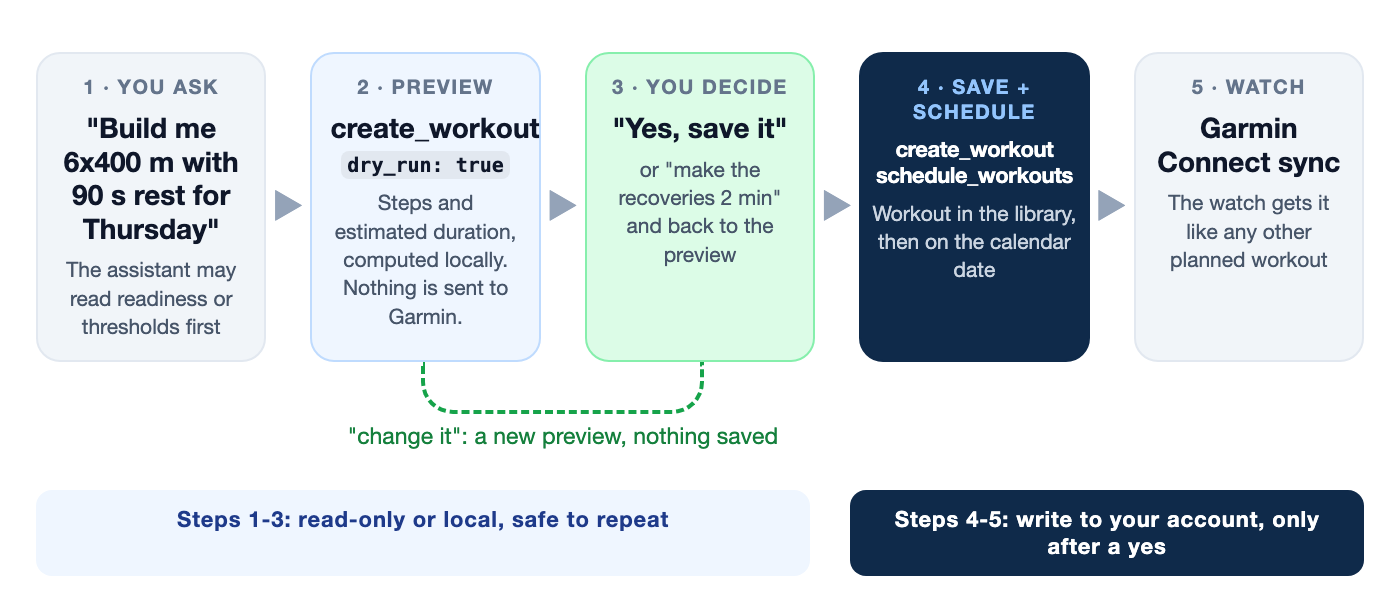
Everything left of the line can be repeated as often as you like. Everything right of it needs your yes.
I want to be precise about how that rule is enforced, because "the AI promised" is not a safety mechanism.
- The tool description tells the model to call
create_workoutwithdry_run: truefirst and to save only after you agree. The server's instructions, which the client reads at the start, say the same. - The dry run result itself ends with "Nothing was saved" and the next step to take once you agree.
- Your client is the actual gate. Claude Code, for example, asks you to approve a tool it has not been allowed to run, so a write cannot happen silently unless you allowed it.
- Destructive operations are off by default. Overwriting a saved workout, deleting workouts or activities need
GARMIN_ENABLE_DESTRUCTIVE=true. schedule_workoutsrefuses to move or remove workouts that belong to a training plan.
The server cannot know whether you said yes in the chat; that part is the model following instructions plus your client's approval. So keep approvals on for tools that write, at least until you trust the routine.
What I would tell a training partner
- Start every planning session with a look back and a readiness check. The plan is only as good as what it is based on.
- Read the preview. The model picks warm-ups, paces and recoveries; correct them before saving, not on the track.
- Ask for targets you actually train by: pace if you run on flat roads, heart rate or power if you do not.
- Re-check readiness on the morning of the hard session. A plan made on Sunday does not know how Wednesday night went.
The point of all this is not to hand the planning to a model. It is to spend the time on the decisions that matter, how hard, how much and whether today is the day, instead of in the workout editor.
The code and documentation:
- Repository: https://github.com/endurancetools/garmin-mcp
- Documentation: https://endurancetools.github.io/garmin-mcp/
Unofficial; not affiliated with or endorsed by Garmin.
Some illustrations in this article were generated with ChatGPT.
 Follow @marcin_running on Instagram