Designed tools, not an API mirror: 21 MCP tools on a byte budget
How I shaped an MCP server around the questions people ask, kept its tool list small with a test that counts bytes, and what those bytes turned out to be in tokens.
- Code & method included
- AI-assisted, author-checked
One question, one well-shaped tool. (AI-generated illustration)
I run, and I write software. For a while I wanted to ask an AI assistant the things I would ask a coach: can I do the hard session today, how did the last block go, build me intervals for Thursday. So I built Garmin MCP, an unofficial, open-source MCP server for Garmin Connect that runs on your own machine.
This article is not about running. It is about the tool list: what a tool should be, what the list costs the model on every request, and the rules I ended up with for keeping it small while the server kept growing. Garmin is only the example. The same decisions come up in any MCP server that wraps a large API.
Start from the questions, not the endpoints
The obvious way to build an MCP server is one tool per API endpoint. My coverage map of Garmin Connect lists 111 reads. A mirror of that would be a tool list of that length, read before every answer, and most real questions would still take several calls plus arithmetic the model does on its own.
I started from the questions instead, and the server has 21 tools. "Review my week" is one call to get_period_summary. "Can I train hard today?" is one call to get_readiness, which compares HRV, resting heart rate, hours of sleep and training load with your own baselines and returns a GO, MODIFY or REST decision together with every number and rule it used. (It is training information, not medical advice.) The server downloads what is missing, joins the data and does the maths. The model gets one dense answer and explains it.
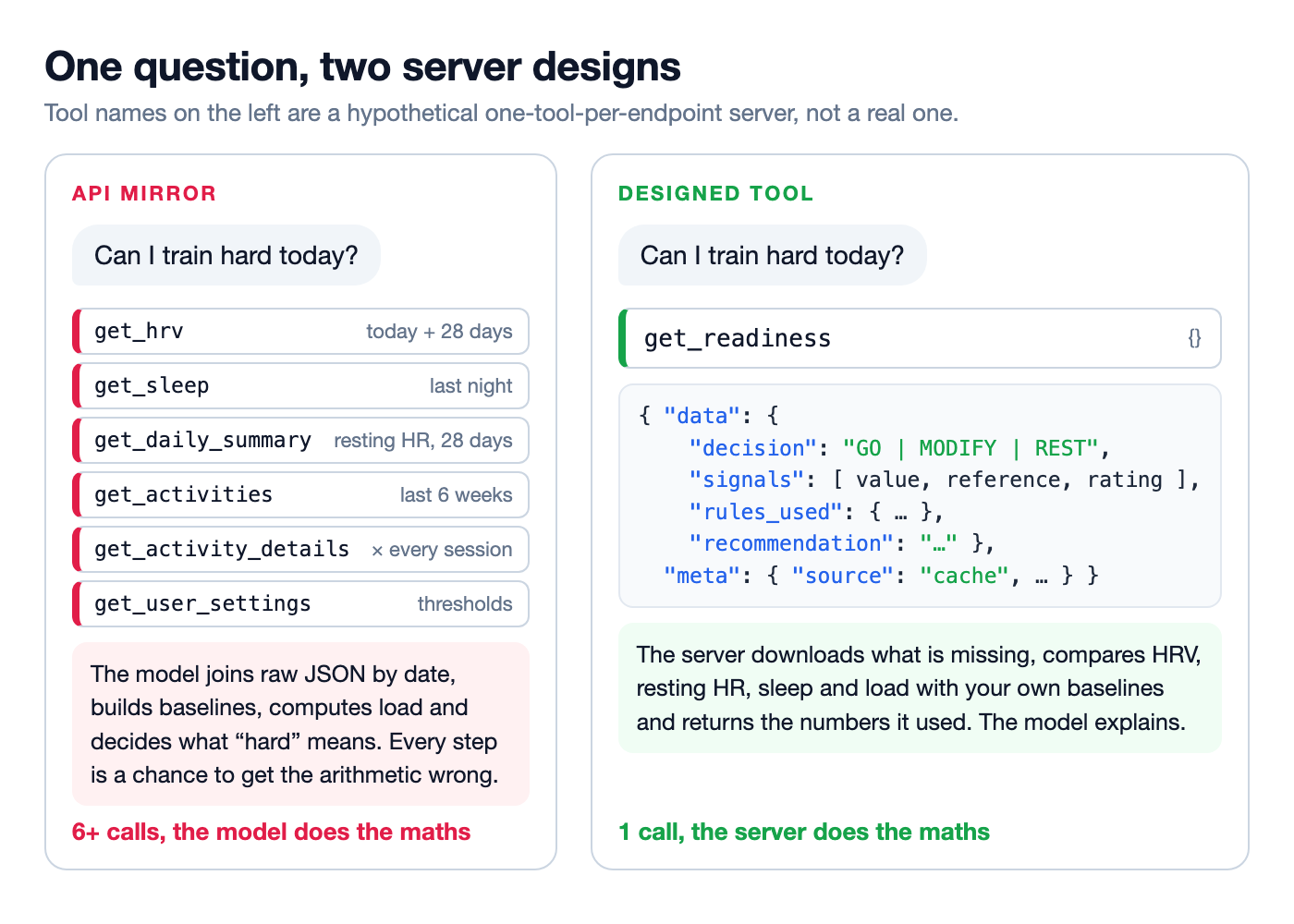
The same question against a hypothetical one-tool-per-endpoint server and against a tool built for it.
This has a price. The tools have opinions: a week summary contains what I decided it contains. Of those 111 reads, 76 are fully served, 14 partly and 21 not yet. I think that is the right trade for a server meant to answer questions, and the wrong one if you want a general API client.
A tool built around a question also needs a description built around it. I try to make every description say three things: which questions the tool answers, which tool to use instead for the neighbouring questions, and what comes back when there is no data. Here is the one for readiness:
description:
  'Morning GO/MODIFY/REST decision from HRV, resting HR, sleep hours and load against your own baselines. ' +
  'Returns each signal with its value, reference and rating (ok, yellow, red; unknown when data is missing), ' +
  'rules_used and a recommendation that starts with the signals that decided. ' +
  // ...
  'Use for "how am I today" or "can I do a hard session".',
The tool list is a bill paid on every request
MCP clients pass the name, description and input schema of every tool to the model with each request. Whatever the user asks, the model reads the whole list first. For the 21 default tools of version 0.7.0 that is 38,762 bytes of JSON.
I measured it per tool from the built server's tools/list. One tool dominates: create_workout takes 11,936 bytes, 31% of the list, because a structured workout has nested steps, repeats and targets. The smallest, get_devices, takes 410.
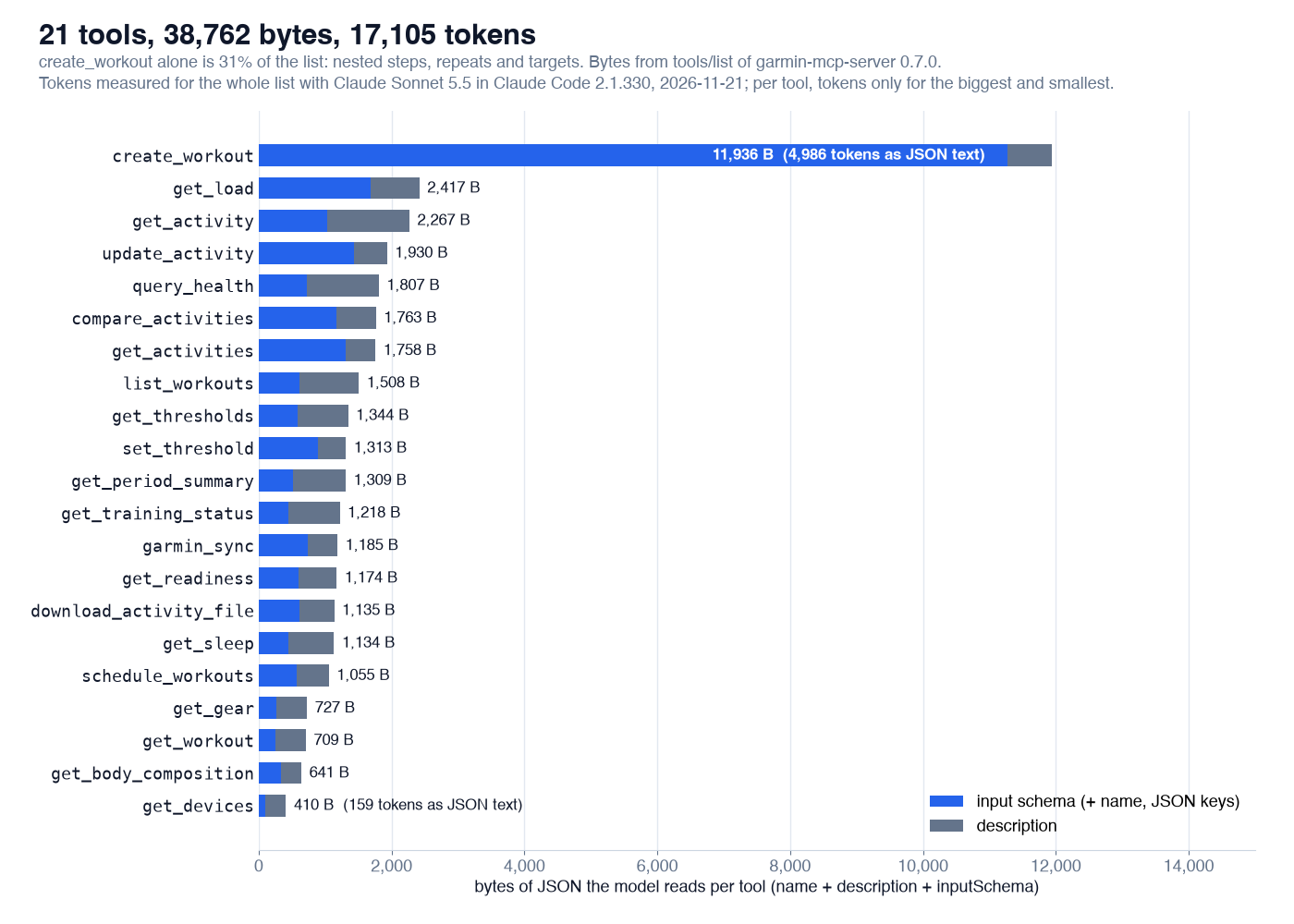
What the model reads per tool, in bytes, split into input schema and description. Tokens measured with Claude Sonnet 5.5.
Bytes are not tokens
The model does not read bytes. For weeks I turned the byte count into "about 9,700 tokens" with the usual rule of four bytes per token, and that number went into my README. Then I measured it.
The method needs no API key: claude -p "Reply with OK." with only this server connected, the same with no server, and the difference in the prompt tokens that usage reports for the first request. A third run with all 21 tools denied keeps the server's instructions and drops the definitions. The server had its real tools and a fake data layer, so nothing reached Garmin.
On 21 November 2026, with Claude Code 2.1.330 and Claude Sonnet 5.5, the 21 tool definitions took 17,105 tokens and the server's instructions 489 more: 17,594 tokens on every request. Haiku 5.5 and Opus 5.5 came within a dozen tokens of that, and two repeats on Sonnet moved by 4 and 6. My estimate was too low by almost half.
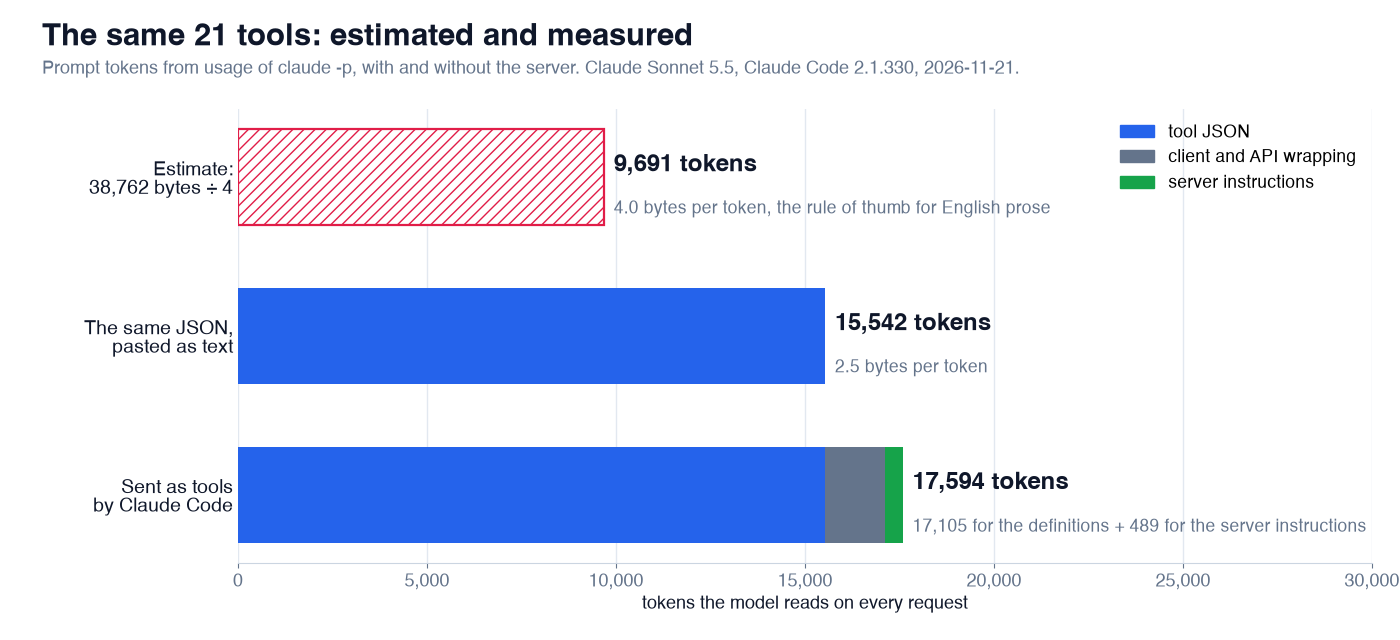
The same tool list, estimated and measured. Claude Sonnet 5.5 in Claude Code 2.1.330; Haiku 5.5 and Opus 5.5 within a dozen tokens.
Four bytes per token is a rule for English prose, and a tool list is JSON: quotes, braces, keys such as "type":"string", enum values and identifiers. Pasted into a prompt as plain text, the exact 38,762 bytes the test counts are 15,542 tokens, 2.5 bytes per token; even get_devices, mostly description, came out at 2.6. This server's answers, compact JSON too, came out at 1.6 to 2.4 when I measured them later in this series. The other 1,563 tokens are what the client and the API add when the definitions go out as tools, starting with the mcp__garmin__ prefix on every name.
A test that counts bytes
Numbers like this drift. Every new parameter and every clarified sentence adds a little, and nobody notices until the list is twice the size. So the size lives in a test (trimmed):
it('tool list stays within the context budget', async () => {
  const size = (value: unknown) => Buffer.byteLength(JSON.stringify(value));
  const context = (list: { name: string; description?: string; inputSchema: unknown }[]) =>
    size(list.map(({ name, description, inputSchema }) => ({ name, description, inputSchema })));
  const tools = (await (await connect(runtime())).listTools()).tools;
  // 2020-12 is MCP's default dialect, so no input schema spends context on naming it.
  expect(tools.filter((t) => '$schema' in t.inputSchema)).toEqual([]);
  expect(context(tools)).toBeLessThanOrEqual(39_753);
  expect(size(tools)).toBeLessThanOrEqual(91_588); // the whole tools/list, outputSchema included
});
The limits are the measured size plus about 1,000 bytes. When a change crosses one, the build fails, and I either cut something or raise the limit on purpose, with the new measurement in the commit message. create_workout has its own limit of 11,500 bytes for its input schema, so the biggest tool cannot quietly eat the margin of the others.
The test still counts bytes, and after measuring tokens I think that is right. Bytes are exact, free and the same on every machine, so the test runs offline in CI with no model and no API key; tokens depend on the model, the client and its version. For the same kind of content the two move together: at the 2.3 bytes per token of the definitions as sent, the limit of 39,753 bytes is roughly 17,500 tokens and the margin about 440. What bytes cannot give you is the token figure itself. For that you measure once, with your client and model, and do not divide by four.
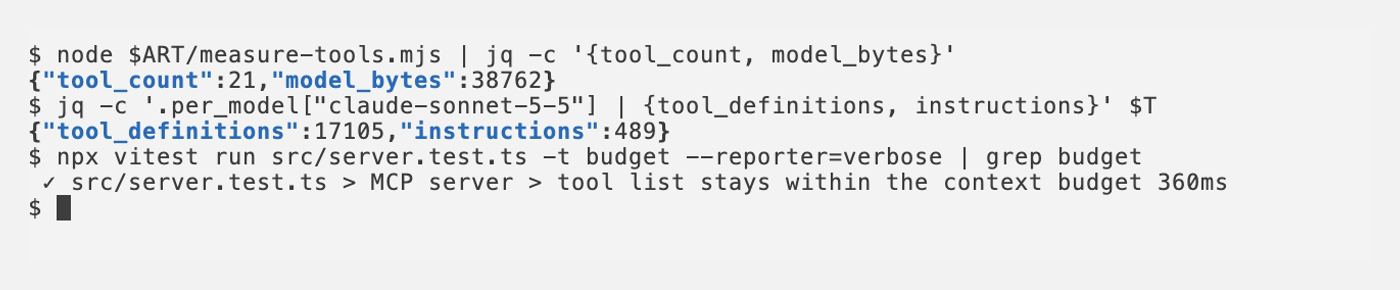
Bytes from the built server, tokens measured with Claude Code, and the test that guards the bytes.
Three changes the test paid for
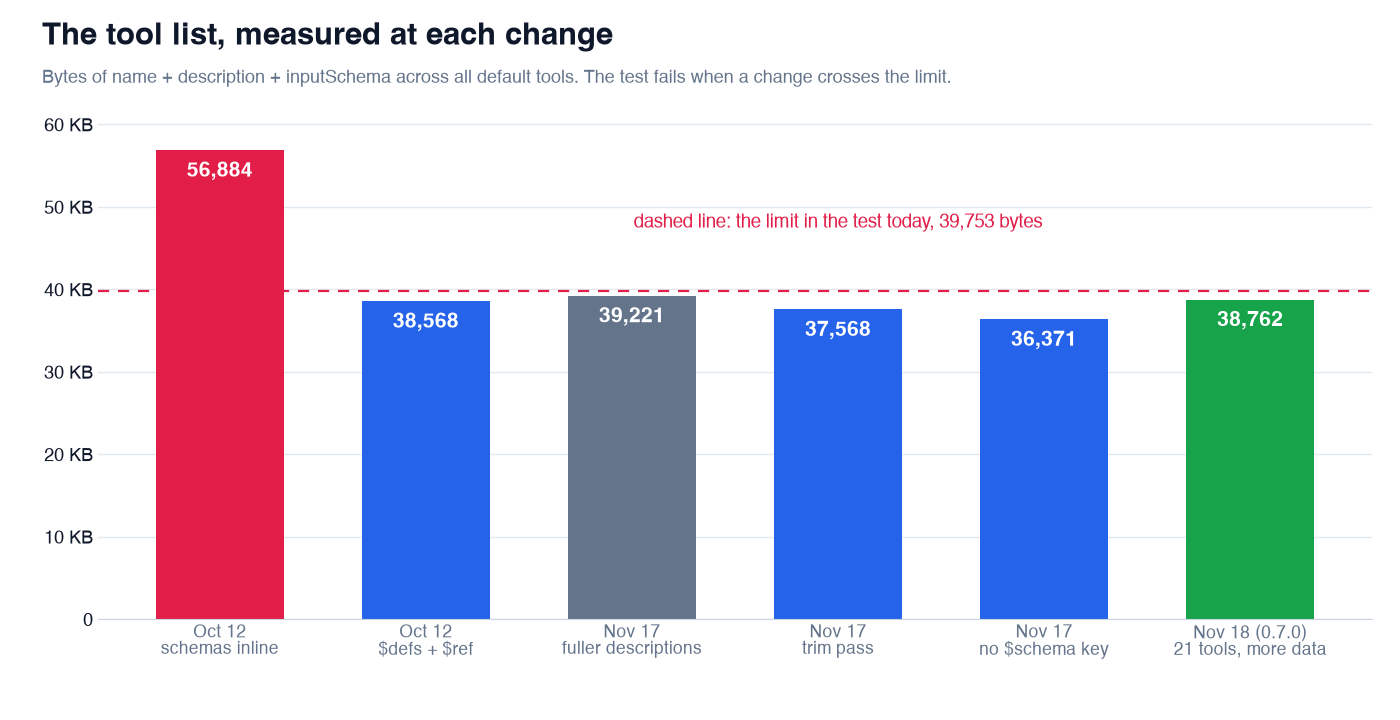
The size of what the model reads, at each change I measured. The limit moved down and up, always on purpose.
Shared schemas in $defs. The first version of the workout schema copied Target, Duration and Step inline into every field that used them. Giving those sub-schemas an id, so they land once in $defs and every use is a $ref, took the whole list from 56,884 to 38,568 bytes and create_workout from 20,544 to 11,386. My target was 28,000; I could not reach it without changing how a workout is described, so the limit sits near the measurement.
One tool instead of two. There used to be a preview_workout next to create_workout with the same input schema: the biggest schema in the server, sent twice. Now one tool takes dry_run: true, and its description tells the model to call it that way first and save only after the user agreed.
No $schema key. MCP reads a schema that names no dialect as JSON Schema 2020-12, which is what zod emits anyway. Yet the key cost 57 bytes in every tool, and at least one client hands the input schema to the model as it is. A small wrapper strips it from the JSON Schema while zod keeps validating:
function withoutDialect<S extends z.ZodObject>(schema: S): StandardSchemaWithJSON<z.input<S>, z.output<S>> {
  const std = schema['~standard'];
  const strip = (io: 'input' | 'output') => (options: Parameters<typeof std.jsonSchema.input>[0]) => {
    const { $schema: _dialect, ...rest } = std.jsonSchema[io](options);
    return rest;
  };
  return { '~standard': { ...std, jsonSchema: { input: strip('input'), output: strip('output') } } };
}
The limit has gone up as well as down. A directory that scores tool descriptions marked several of mine down for not saying when to use the tool, which one to use instead and what comes back without data. Fixing that took the list to 39,221 bytes. A trim pass took 1,653 back out: text repeated between a description and its parameters, implementation details, and example calls for tools with flat inputs. The test did not stop the growth. It made me look at it before merging.
Where new data goes
Over the last releases the server learned hourly health data, typed splits, climbs, a power curve, a sleep timeline, training plans and more. The tool count stayed at 21, because new data goes where it costs the model least, in this order:
- A new field in an answer that already exists. Clients do not pass output schemas to the model as part of the tool definition, so this costs 0 bytes of context.
- A new value of an existing enum.
detail: "power_curve"inget_activity,granularity: "hour"inquery_health. A word, plus a clause in the description. - A new optional input field.
history: trueinget_thresholds. One property. - A resource, a prompt or a CLI command. Outside the tool list entirely.
Only after that comes a new tool, with a whole definition in every request and one more option for the model to confuse with the others.
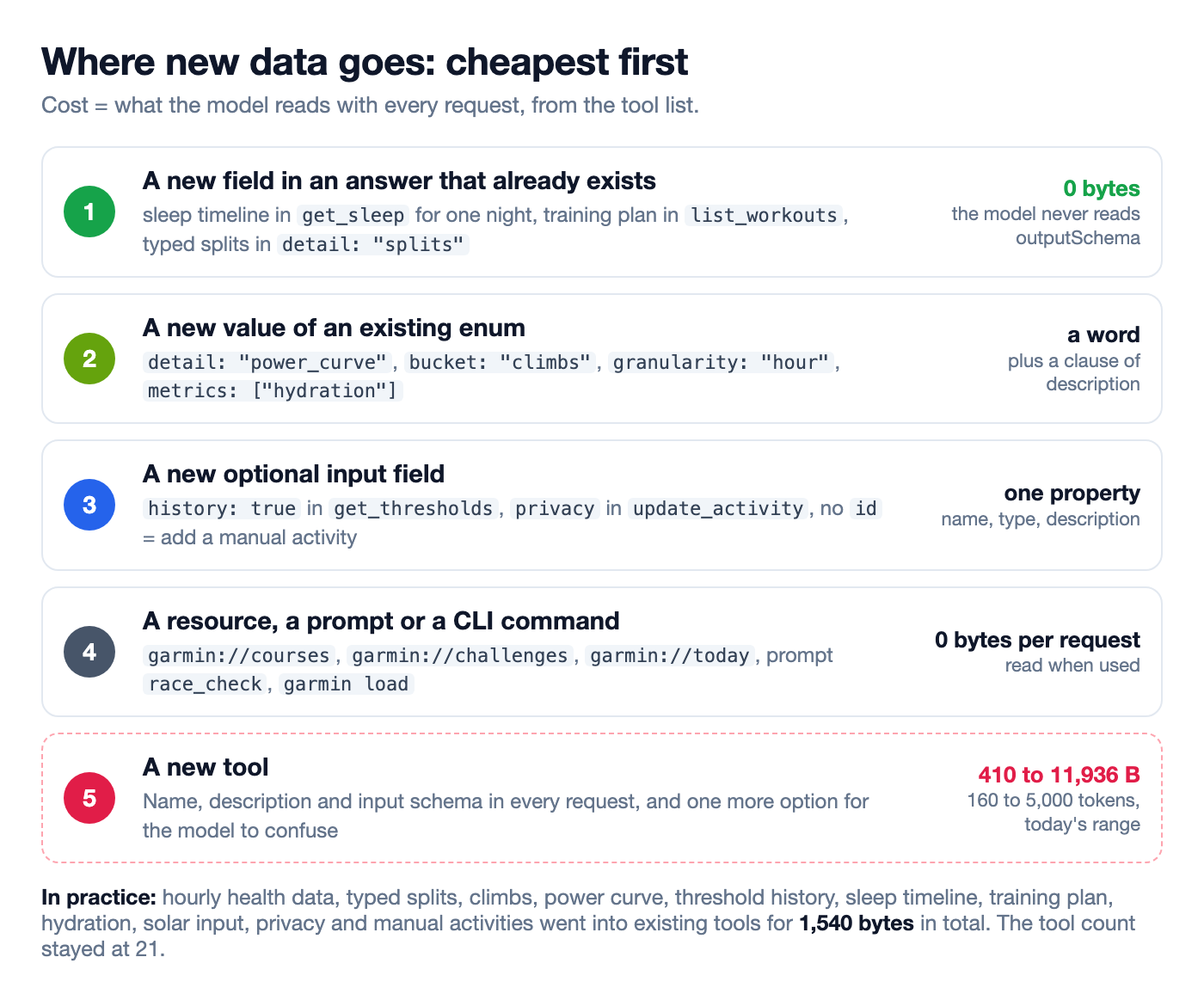
The order I check before adding anything. All the data listed above went into existing tools for 1,540 bytes in total.
One envelope for every answer
Every tool returns the same shape: { data, meta }. meta.source says whether the answer came from the local cache, live from Garmin, partly (some days are still downloading) or was computed locally. meta.fetched_at is when the oldest record in the answer was downloaded. When automatic downloads are off, meta.sync_hint names the sync that would fill the gap, and the server instructions tell the model to ask the user before running it.
{
  "data": { "decision": "MODIFY", "signals": [], "rules_used": {}, "recommendation": "..." },
  "meta": { "source": "cache", "fetched_at": "2026-11-18T05:12:40.000Z" }
}
The same JSON goes out twice: as text, for clients without structured output, and as structuredContent, typed by the tool's outputSchema, which the SDK checks on both ends. Output schemas are not cheap. With them the full tools/list response is 91,011 bytes, more than twice the part the model reads, so the test keeps a separate limit for it.
Errors have a shape too: { "error": { "code", "message", "hint" } }, and the hint is written for the model to pass on. An expired session says "Tokens are no longer accepted. Log in again with garmin login." Invalid input lists every bad field by path, such as steps[2].steps[0].target.
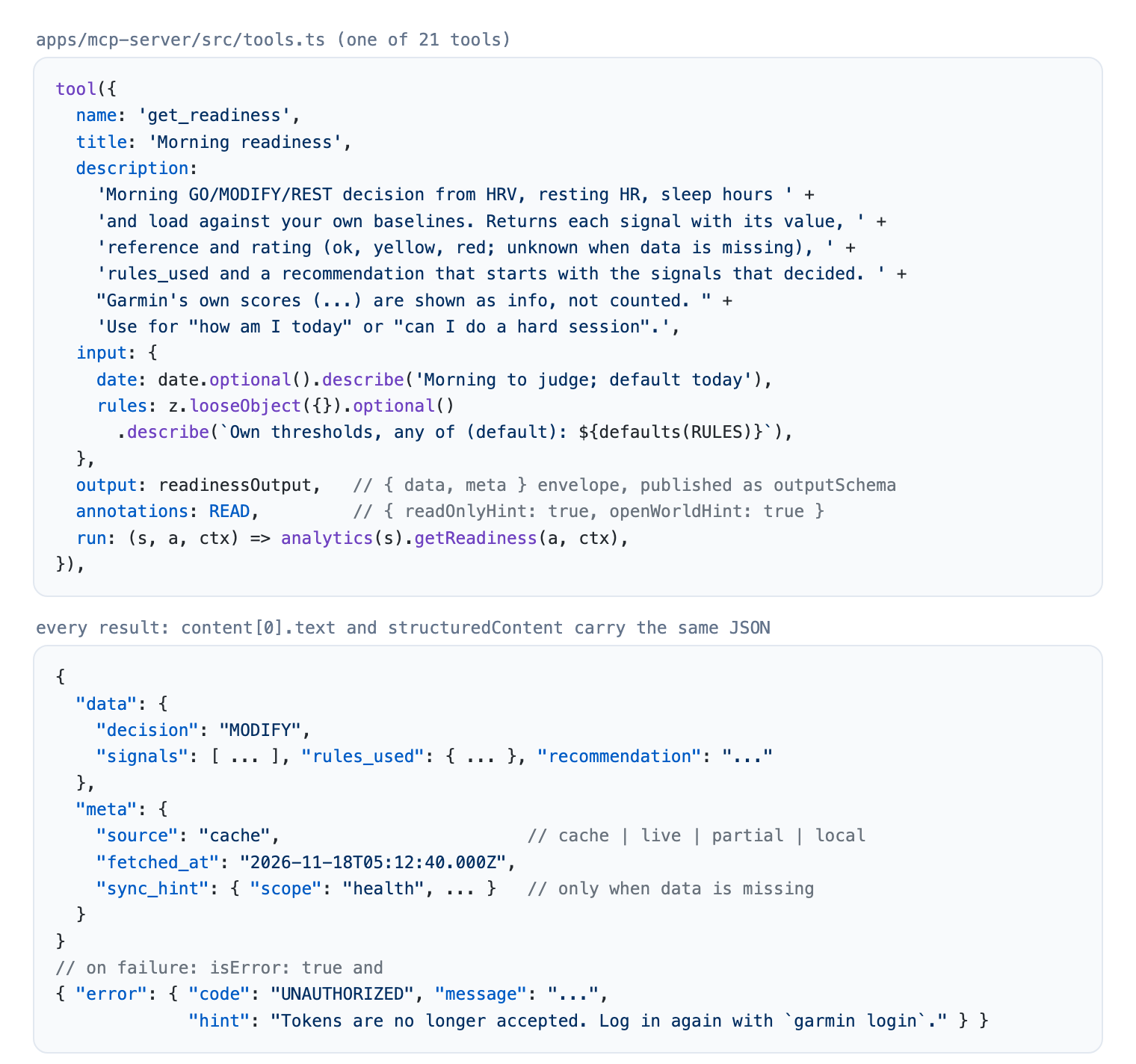
A whole tool definition, the envelope every tool returns and the error shape.
Destructive tools are not in the list
Three tools delete things in Garmin Connect: an activity, a workout, a weigh-in. They do not exist unless the user starts the server with GARMIN_ENABLE_DESTRUCTIVE=true. A tool the model cannot see is a tool it cannot call by mistake, and it costs nothing in context.
Two writes inside always-on tools sit behind the same switch: overwriting a saved workout (workout_id in create_workout) and replacing the strength sets of an activity (exercise_sets in update_activity). With the switch off, the input becomes a strict object, so sending one of those fields fails with an error that names the setting, instead of being silently dropped while the model believes it overwrote something. With everything on, the list grows to 40,748 bytes.
Tools also carry annotations (readOnlyHint, destructiveHint, openWorldHint), so a client can decide which calls to confirm.
Resources and prompts sit outside the bill
Not everything has to be a tool. The server has 8 resources (profile, gear, devices, courses, sync status, garmin://today and more), 3 resource templates for one activity, workout or course, and 5 prompts such as weekly_review and race_check. None of them are in the tool list the model reads with every request.
Some clients read garmin://today at the start of a conversation, so it never downloads anything: the readiness decision, last night in one line and today's planned workouts, from the local cache. The prompts are recipes that chain tools for a longer task, such as a weekly review.
Does the model pick the right tool?
A small tool list can still be a confusing one, so there is an eval: 96 scenarios in English and Polish, each a prompt with the expected first tool call and the tools that would be a mistake, run against the real server with a fake data layer. In the last full run, on 18 November 2026 with Sonnet, the first call was right in 96 of 96. That number says less than it seems, which is the next article of this series.
If you are building an MCP server
- Write the questions down before the tools. A tool per question, not per endpoint.
- In every description, say what the tool answers, which tool to use instead and what comes back empty.
- Measure name, description and input schema in bytes, and put the limit in a test.
- Measure the tokens once, with your client and model. For JSON, four bytes per token undercounts by almost half.
- Share sub-schemas through
$defs, and do not send$schema. - Add new data to an existing answer, an enum or an optional field before you add a tool.
- Return one envelope with provenance, and errors with a hint the model can pass on.
- Keep destructive operations out of the list unless the user turns them on.
The code is at https://github.com/endurancetools/garmin-mcp. The budget test is in apps/mcp-server/src/server.test.ts, the tools in apps/mcp-server/src/tools.ts, and the documentation, including what to ask, is at https://endurancetools.github.io/garmin-mcp/. To try it with Claude Code:
It talks to Garmin Connect's web endpoints, which Garmin can change at any time. I would like to hear how others keep their tool lists in check.
Unofficial; not affiliated with or endorsed by Garmin.
Some illustrations in this article were generated with ChatGPT.
 Follow @marcin_running on Instagram