I asked my AI assistant if I should train hard today. It answered with my HRV.
I built an open-source tool that lets an AI assistant read my Garmin data and answer training questions with numbers I can check: the values, the rules and the papers behind them.
- Own training data
- AI-assisted, author-checked
Morning question, data-backed answer. (AI-generated illustration)
This morning I typed four words into my AI assistant: "Can I train hard today?"
The answer was no. Not "you might be tired" or "listen to your body". It said REST, and then it showed me why:
- my overnight HRV was 28 ms, below my own baseline range of 33 to 42 ms;
- my resting heart rate was 64 bpm, against a 28-day mean of 58.1;
- I slept 6.6 hours, a bit short of the 7-hour line in my rules;
- my training load was fine, so this was not about doing too much.
Two independent signals were red at the same time, and that pair is what turned the day into a rest day. It told me to move the key session by 24 to 48 hours and, if I wanted to move at all, to keep it to 30 to 45 easy minutes.
I am a runner, I ride a bit, and I write software for a living. For a long time I wanted to ask an assistant the things I would ask a coach, and get an answer built from my own data, not from an average athlete. So I built Garmin MCP. This article is about what it does for an athlete, not about the code.
What Garmin MCP is
MCP, the Model Context Protocol, is an open standard for connecting AI assistants to tools and data. Claude, Codex and a growing list of other clients speak it. An MCP server is a small program that the assistant can call when your question needs it.
Garmin MCP is an unofficial, open-source MCP server for your Garmin Connect data. Your assistant gets 21 tools, and each one is shaped around a question athletes actually ask: "review my week", "how did I sleep", "what is my form right now", "can I train hard today". One question is usually one call. The server downloads what it needs, joins it, does the arithmetic, and hands the assistant a compact answer to explain.
It can also go the other way. Ask for "6×400 m with 90 s rest on Thursday" and it shows you the steps and the estimated duration first; nothing is saved until you agree, and then the workout goes to your Garmin calendar and syncs to your watch.
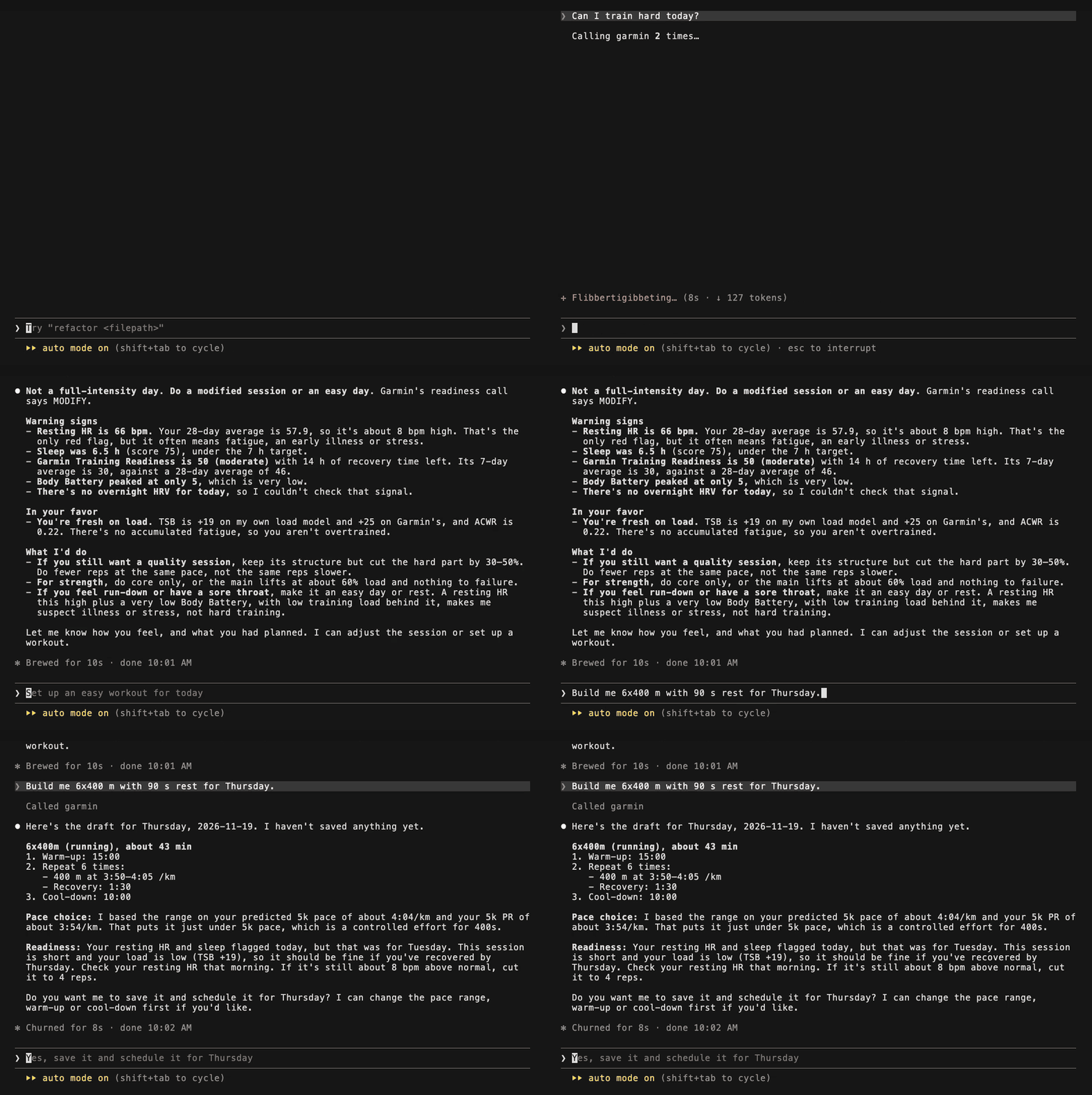
A short session in Claude Code: a readiness question, then a workout that is shown before it is saved.
Why "answers you can check" matters
If you have ever asked a general chatbot about your training, you know the problem. You get something that sounds reasonable and is impossible to verify. Was that number from your data or from a blog post? What threshold made it say "fatigued"?
I wanted the opposite. Every analytics answer from Garmin MCP carries the values it used and the rules it applied, and every rule can be changed. Training load, fitness, fatigue and form (CTL, ATL, TSB), the acute-to-chronic workload ratio and morning readiness are computed on my machine with methods from published sports-science literature. The methods page lists 20 references, and every formula and default is written down, so I can recompute a number by hand if I doubt it.
One honest note before the numbers: this is training information, not medical advice. A readiness decision compares this morning with my own recent baselines. It cannot tell whether I am ill or injured, and if I feel unwell, a doctor beats any algorithm.
Question 1: "Can I train hard today?"
Here is what the assistant got back from the readiness tool this morning, laid out as a card.
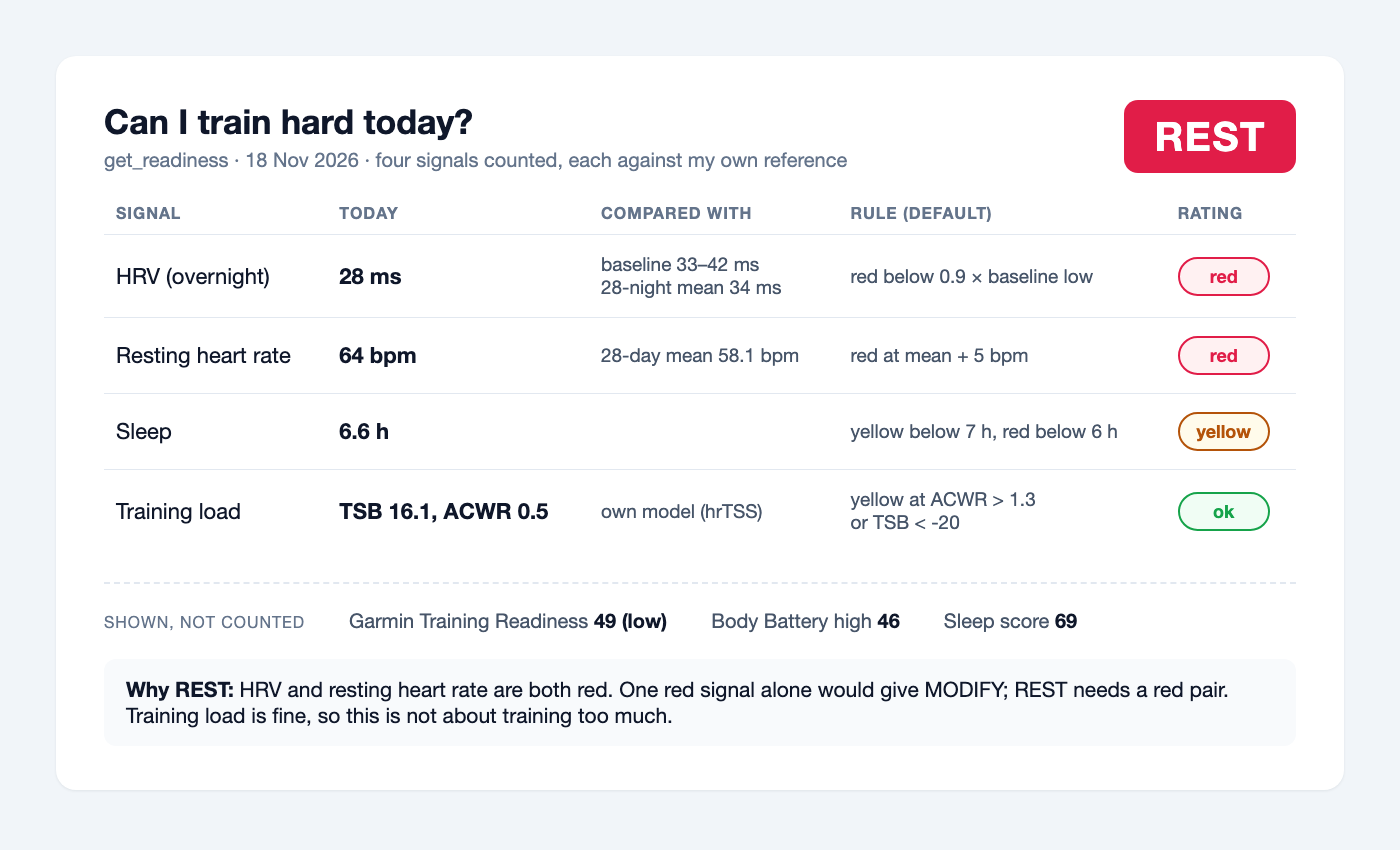
Four signals, each with today's value, what it is compared with and the rule that rated it.
The decision uses four signals: overnight HRV, resting heart rate, hours of sleep and my own training load. Each one is compared with my own reference, not with a population norm. HRV is compared with my rolling baseline and with the mean of the 28 nights before; resting heart rate with the mean of the 28 days before. That follows the idea behind HRV-guided training studies (Kiviniemi 2007, Plews 2013, Javaloyes 2019): what matters is how today's night compares with your own recent nights.
The part I spent the most time on is how the signals combine. One short night lowers HRV, raises resting heart rate and shortens sleep, all at once. If you simply count red signals, a single bad night looks like three independent warnings. So the default rule asks for agreement between sources that fail for different reasons:
- REST only when a pair is red: HRV with resting heart rate, HRV with sleep, or load together with any of the other three.
- MODIFY for a single red signal without its pair, or for two yellows.
- GO otherwise.
The chart below shows why the pairing matters. It is my last 60 days.
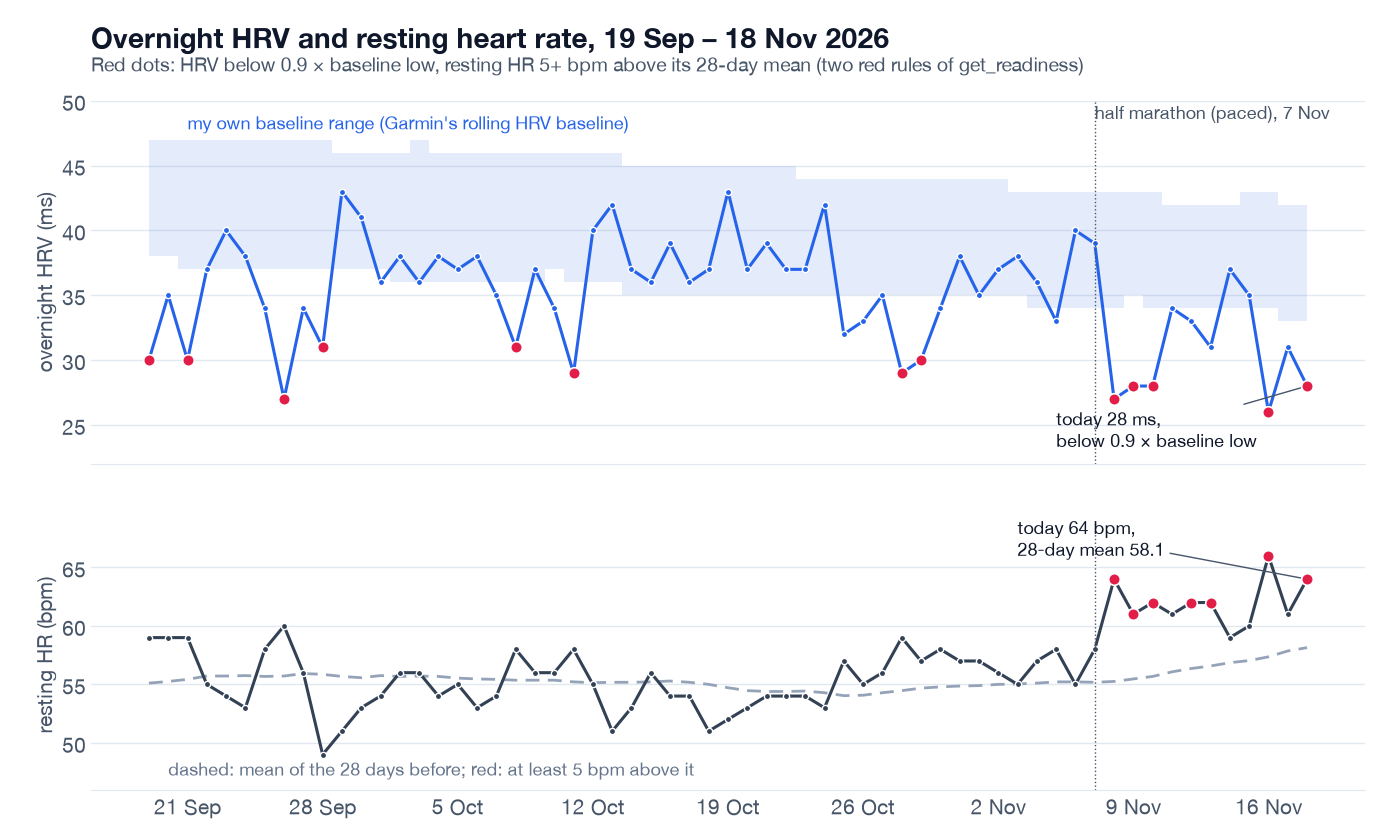
My HRV and resting heart rate against my own norm. Before 7 November a low HRV night never came with a high resting heart rate; after it, both go red on the same mornings.
Between mid-September and the end of October, eight mornings had HRV below my red line. Under a rule that rests you on any red signal, every one of them would have cancelled a session. Under the pair rule, four of them were REST, because each came after a night of under six hours: HRV and sleep agreed. The other four had nothing else red, and the answer was MODIFY: train, but not the key workout.
After 7 November the picture changes. On 8, 9, 10, 16 and 18 November, HRV is red and resting heart rate is 5 or more beats above its mean on the same morning. That pair is what makes today a REST. On 8 November, the day after the half marathon, my own training load was red as well.
If you disagree with my defaults, you change them in the question. "Use 7.5 hours as my sleep target" or "only rest me when three signals are red" become rule overrides, and the answer lists the rules it used, so you always see which version you got.
You do not even need an AI client to see this. The same result is in the command-line tool, read straight from the local database:
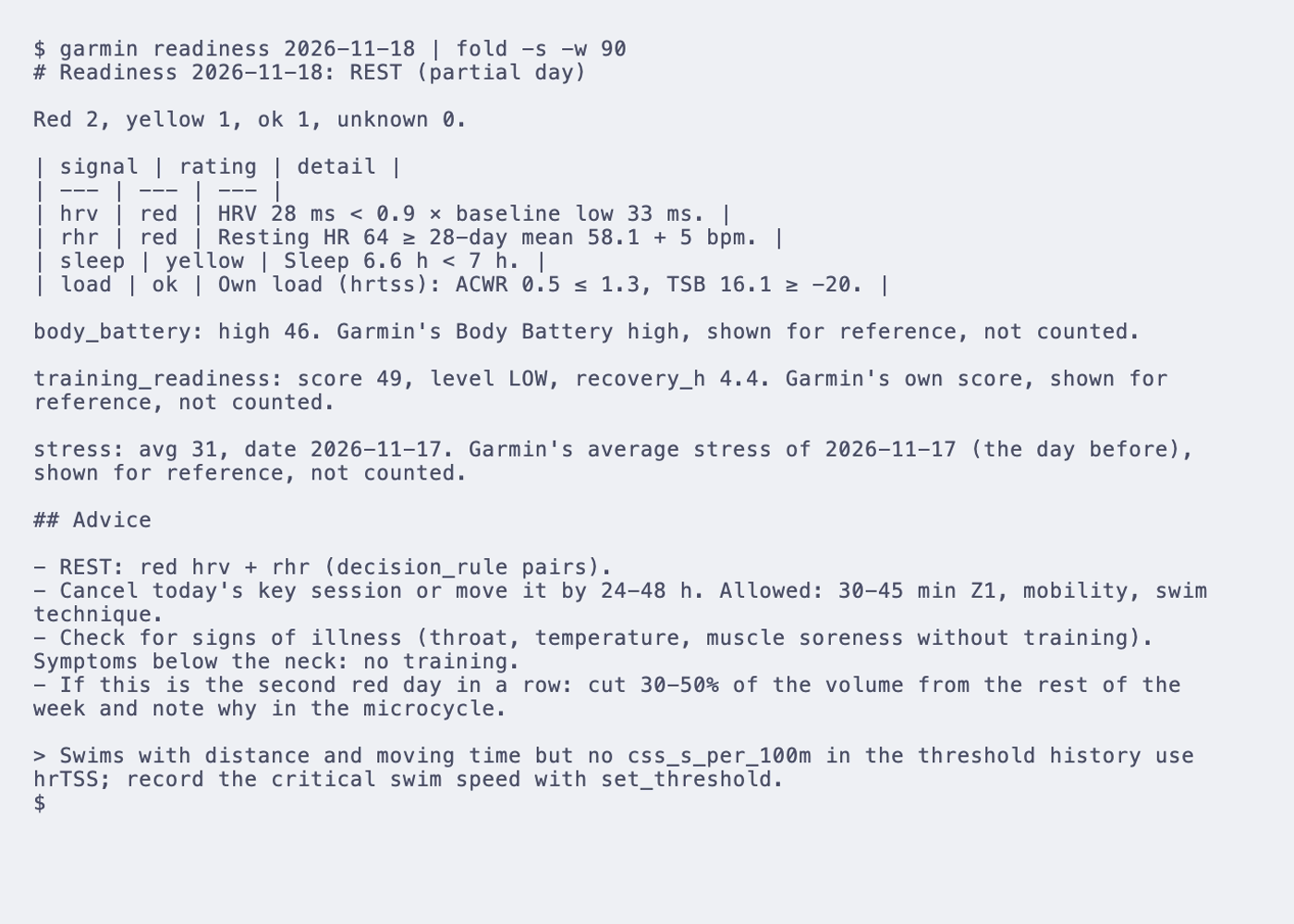
The same decision in the terminal. Nothing here is downloaded; it reads what is already stored on my computer.
Next to Garmin's Training Readiness, not instead of it
My watch has its own Training Readiness score. This morning it said 49, low. So why build another one?
Because I wanted to see the reasoning. Garmin's score blends HRV, sleep, recovery time and recent load into one number, and I cannot change how it weighs them. Body Battery and the stress score are built from largely the same inputs. If my decision counted those scores as well, one poor night would be counted two or three times.
So Garmin's scores are shown in every readiness answer, and never vote. Training Readiness, Body Battery, stress and the sleep score sit next to the decision for comparison. This morning they agreed with it. When they don't, I have two opinions and the numbers behind one of them, which is a better place to start a decision than a single number on the watch face.
Question 2: "Review my training week"
The REST this morning did not come from nowhere. After three quiet weeks, my running volume roughly doubled in the week of 2 to 8 November, and I finished it by pacing a half marathon on Saturday. I asked the assistant to review that week.
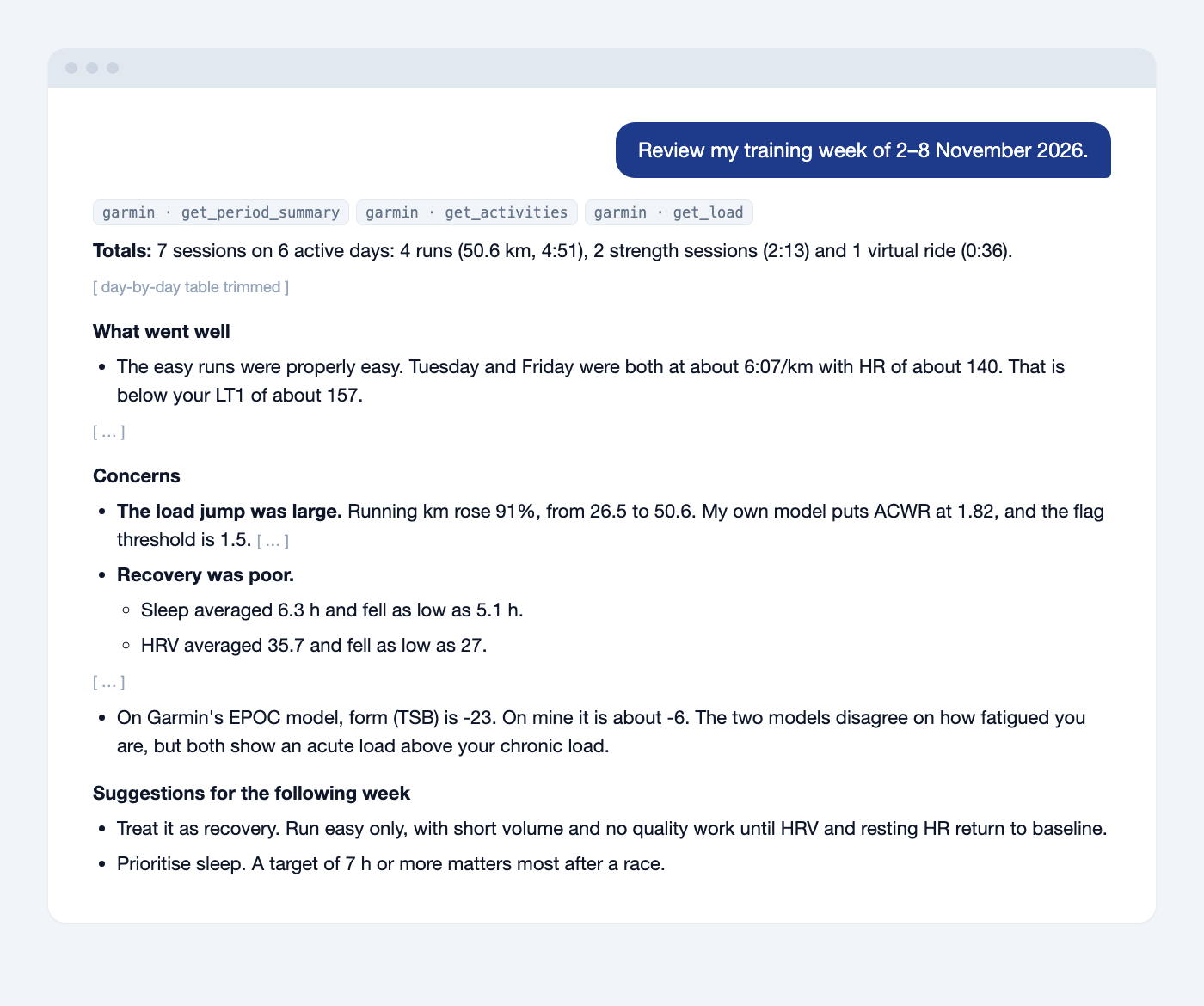
An excerpt of the real answer, trimmed. The day-by-day table is left out.
What I like here is that it did not just list sessions. It noticed that my running volume went up by 91% compared with the week before, and that my acute-to-chronic workload ratio was 1.82, above the 1.5 flag. It also checked that my easy runs were actually easy, below my first lactate threshold.
A caveat the tool itself makes: a high ACWR flags a sudden jump in load compared with what you are used to. It does not predict injuries, and the literature on that is far from settled (Gabbett 2016, Impellizzeri 2020). I read it as "you changed something quickly", not as a warning siren.
It also showed two models side by side. My own load model, which computes training stress from power, pace or heart rate, put my form at about −6. The same averages run on Garmin's training load put it at −23. They disagree on size and agree on direction. Seeing both is more useful to me than either one alone.
The week after that, I barely trained: one walk in seven days.
Question 3: "How did I sleep this week?"
The last question was the simplest, and the answer was one table plus four observations. Over the past seven nights I averaged 6.1 hours, against 6.35 over the last 28 days. Three nights were under six hours. The worst was 16 November: 4 hours 10 minutes, no REM recorded, and my lowest HRV of the week at 26 ms. One night logged almost nine hours of sleep but also about three hours awake, so the duration alone was flattering.
This is the kind of thing I could find in the Garmin Connect app, but it would take a dozen taps and some mental arithmetic. Here it is one sentence in, one compact answer out, and the next question ("so should I do my long run on Saturday?") can build on it.
Local and private by design
When you give a tool access to your health data, where that data goes matters. This is how Garmin MCP handles it.
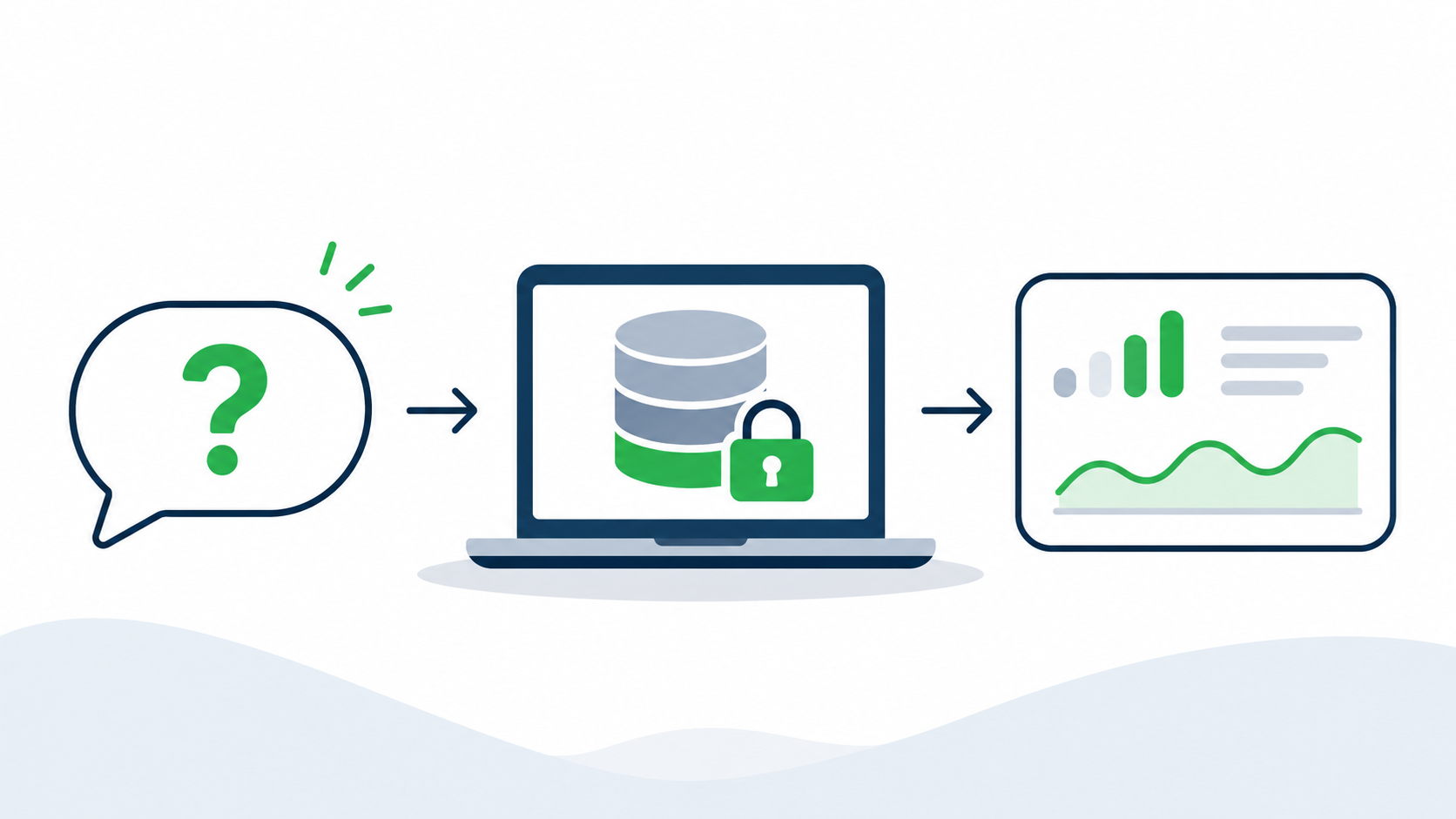
Question in, local database in the middle, answer with numbers out. (AI-generated illustration)
- You sign in on Garmin's own page. The first question that needs Garmin opens Garmin's real sign-in page in your browser, including MFA. Your password never passes through the tool; only the tokens Garmin issues are stored.
- Your data stays in a local database. Everything downloaded goes into a SQLite file in
~/.garmin-mcpon your computer, readable only by you. Answers come from there: on my account, after a 90-day sync, they take between 1 and 110 ms. - It downloads only what a question needs. Nothing is fetched when you sign in. A day that is already stored is never downloaded again. Long ranges go in 7-day chunks with a random 1 to 11 second pause, capped at 600 requests a day, and a rate-limit response pauses everything for six hours. My first 90-day sync took 433 requests over about an hour.
- Answers go only to the client you connect. To be precise about what "local" means: the tool's answers go to your AI client, and from there to that client's model provider. Your Garmin data does not go anywhere else.
Try it
You need Node.js 22 or newer and a Garmin Connect account. In Claude Code it is one command:
Then ask a question. The first one opens Garmin's sign-in page; after that, everything is a conversation. Claude Desktop has a one-click extension, and Codex, Antigravity CLI, opencode and any other MCP client work with the same npx -y garmin-mcp-server command.
Good first questions: "Can I train hard today?", "Review my training week", "How did I sleep this week?", "Am I fatigued? What is my form right now?" and "Build me 6×400 m with 90 s rest for Thursday".
A few things to know. It is unofficial and uses the same web endpoints as Garmin's own site and app, which Garmin can change at any time. The defaults are starting points from the literature, not personal prescriptions; the more of your real thresholds you record, the better the load numbers get. And the analytics need history: the load signal stays unknown for the first 42 days.
I am still the one who decides whether to run. But this morning I made that decision with my HRV, my resting heart rate and my last two weeks in front of me, and with the rule that weighed them written down. I took the rest day.
Code and issues: github.com/endurancetools/garmin-mcp. Documentation, including every formula and its references: endurancetools.github.io/garmin-mcp.
Unofficial; not affiliated with or endorsed by Garmin.
Some illustrations in this article were generated with ChatGPT.
 Follow @marcin_running on Instagram