A local-first cache in front of a rate-limited API (and a sign-in that never sees your password)
How my Garmin MCP server downloads only what a question needs, paces itself against an API with no published limits, and signs in through Garmin's own page.
- Code & method included
- AI-assisted, author-checked

Answers come from the drawer; the gate is visited rarely and slowly. (AI-generated illustration)
I run, and I write software. Garmin MCP is my unofficial, open-source MCP server that lets an AI assistant answer questions about my Garmin Connect data: training load, sleep, workouts. The previous article in this series was about the tool list the model reads. This one is about the layer underneath it, the part that talks to Garmin.
That layer has two awkward constraints. Garmin Connect's web endpoints are not a public API, and nobody publishes their limits; lean on them too hard and the cost is a blocked account or a Cloudflare wall, not a failed request. And they sit behind a sign-in whose password I do not want to see.
So the server is built local-first. A SQLite database on your machine is the source of every answer, Garmin is only a way to fill it, and filling it is slow on purpose.
Nothing happens until a question needs it
Signing in downloads nothing. Starting the server downloads nothing. There is no initial sync of years of history. The first tool call fetches exactly the days its answer needs.
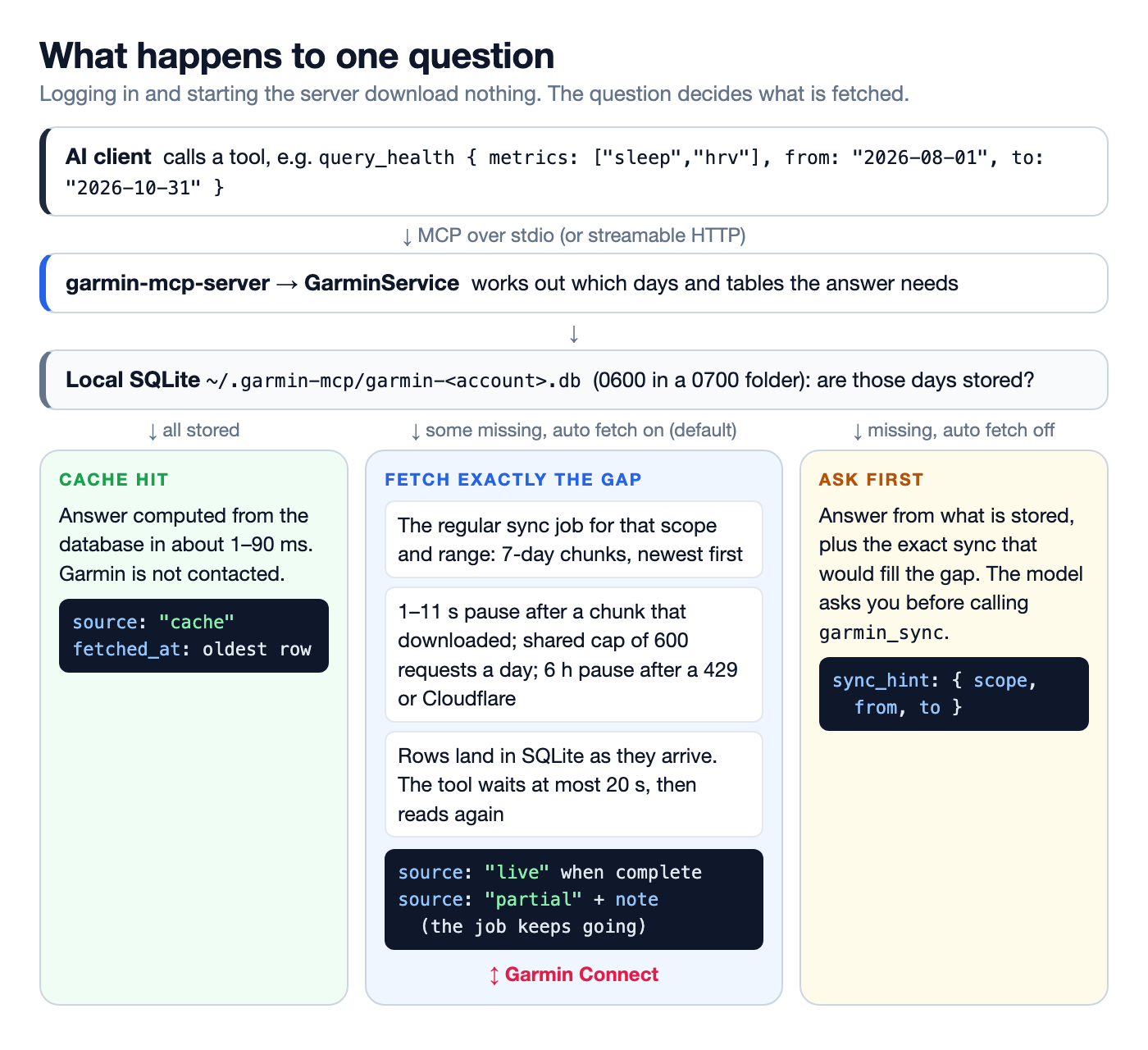
Three ways a question can go. Every answer says which one it took in meta.source.
When everything is stored, the answer comes from the database and meta.source is cache. When something is missing, the tool downloads that range, waits at most 20 seconds and reads again. If the download finished, the answer is live. If not, it returns what it has with source: "partial" and a meta.note saying when to ask again, while the download continues in the background.
Stored days are not downloaded again. A past day fetched after it ended is final. Only today and yesterday go stale, after 15 minutes (today's HRV and training status after an hour), because the watch may still sync more. Repeating a question costs Garmin nothing.
The read path does not fetch; it reports a gap
The design decision I like most here is that reads never call Garmin directly. A read checks coverage and, when days are missing, puts the exact sync that would fill them into the answer as meta.sync_hint: a scope (health, activities, all...) and a date range.
What happens next depends on one setting. With GARMIN_AUTO_FETCH=true (the default), a wrapper runs the regular sync job for exactly that hint and reads again (trimmed):
async withAutoSync<T>(read: () => Promise<T>): Promise<T> {
  const first = await read();
  const hint = first.meta?.sync_hint;
  if (!this.#autoSync || !hint) return first;
  const job = this.jobs.start({ scope: hint.scope, from: hint.from, to: hint.to });
  const report = await Promise.race([job, timeout(this.#budget)]); // 20 s
  const second = await read();
  if (!second.meta.sync_hint) return { ...second, meta: { ...second.meta, source: 'live' } };
  const { sync_hint: _, ...meta } = second.meta;
  return { ...second, meta: { ...meta, source: 'partial', note: autoSyncNote(report) } };
}
With GARMIN_AUTO_FETCH=false, the hint goes to the model as it is, and the server instructions tell it to ask the user before calling the garmin_sync tool with it. Same data, same gap, one flag deciding who pulls the trigger.
So there is only one way data comes in: the sync job. garmin sync in the terminal, the garmin_sync tool and a question that needs October all run the same code, with the same chunks, pauses and limits. One job runs at a time per process; a second question that needs data while a sync runs joins it instead of starting another.
Pacing: chunks, pauses and a daily budget
The job splits a range into 7-day chunks and works newest first, because when the budget runs out, the recent days are the ones a question most likely needs. Inside a chunk, at most 4 requests run at once and request starts are 250 ms apart with ±25 % jitter. After a chunk that actually downloaded something, it pauses for a random 1 to 11 seconds. A chunk made only of stored days costs no requests and gets no pause.
Every request counts toward a daily counter, a row in the database's meta table keyed sync:requests:<day>. At 600 the job stops, reports status: "budget" with the remaining range and the next local midnight, and the next question continues from there. Before each chunk the job estimates its cost and does not start a chunk that would pass the cap.
A few downloads happen outside the sync job because no date range describes them: the FIT file behind a power curve, the hourly heart rate and stress series of a day, Garmin's threshold history. They go through two small gates, Syncer.lazyRequest and Syncer.ensureIntraday, which count the request before sending it and refuse to send it at the cap or during a pause. One honest exception: the detail sections of a single activity (splits, zones, weather) are one request each, stored for good, and not counted.
When Garmin pushes back, the HTTP client first retries 429s and 5xx responses up to four times with a backoff of 1, 2, 4 and 8 seconds, honouring a short Retry-After. If that does not help, the error is fatal for the whole job: a 429 or a Cloudflare challenge pauses all syncing, jobs and lazy fetches alike, for 6 hours. An expired session pauses it for an hour or until you sign in again. The pause lives in the same meta table, so the CLI and the server respect each other's.
Here is what that looks like in practice, reconstructed from my own database. Every stored row has a fetch time, so a sync can be replayed request by request without looking at any of the values.
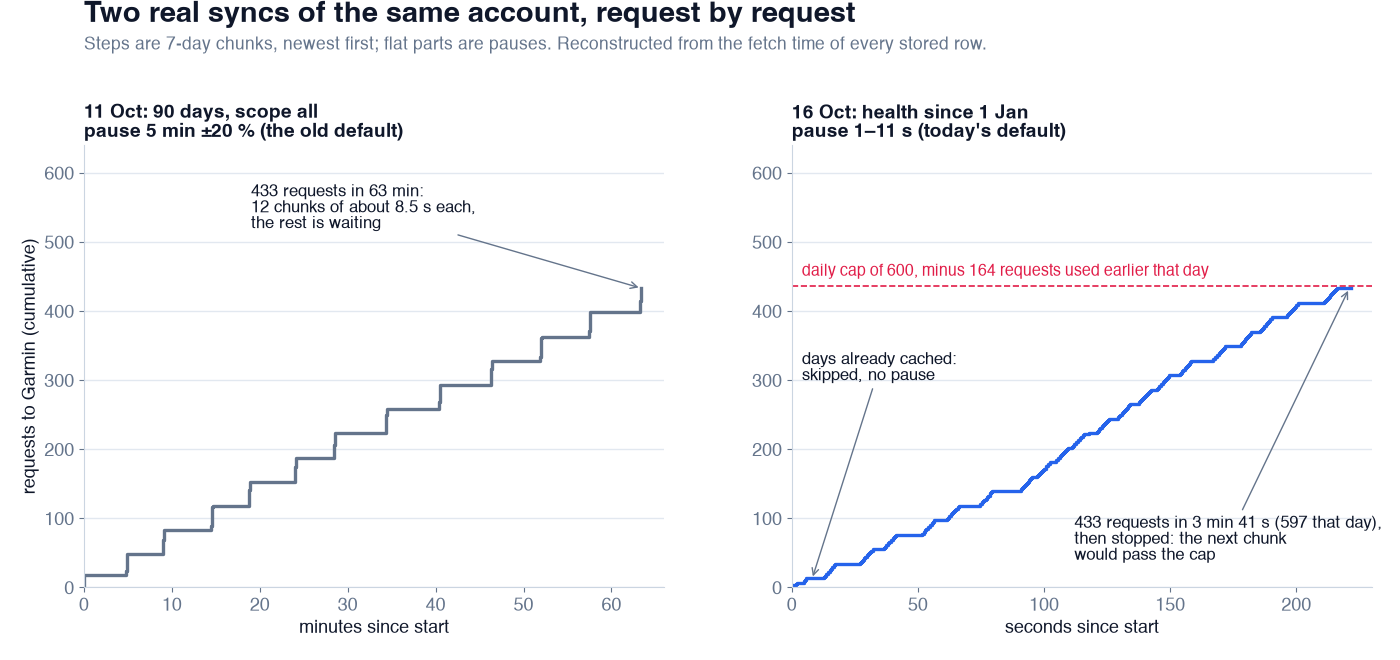
Two real syncs of my account. Requests are reconstructed from per-row fetch times (training status counts as two requests per day); totals come from the sync log.
The left chart is my first 90-day sync, and it ran with the pause I started with: five minutes, ±20 %. The chunks themselves took about 8.5 seconds each. The hour was almost all waiting. Zero 429s, but it was more cautious than it needed to be, and I shortened the pause to 1 to 11 seconds the next morning.
The right chart is a later sync with the new pause: health data since 1 January. July to October was already stored, so those chunks passed without a request and without a pause. Then it downloaded 433 requests in 3 minutes 41 seconds and stopped, because 164 requests had been used earlier that day and the next chunk would have crossed 600. The rest of January and February would have come with the next question about them; none has asked yet.
One thing the logs taught me: the cap is checked before each step, not inside one. A reference refresh (profile, gear, devices, workouts) cannot estimate its cost up front, so a job that started at 597 that evening finished at 658. The cap is soft by one step.
Resuming is free because the data is the checkpoint
A sync that dies halfway, because the laptop slept or the client restarted, needs no recovery logic. On start, the server marks any sync still logged as running as interrupted. Running the same sync again plans the same chunks, finds most days already stored and fresh, and skips them without a request. The only state worth checkpointing is the data itself, and it is written row by row as it arrives.
Pausing for a rate limit, hitting the daily cap and closing the terminal all end the same way: ask again later, and it continues. Pre-loading with garmin sync just runs, ahead of time, the job a question would have run.
What the cache buys
The payoff is on the other side. I timed tool calls to the built server over stdio, on a copy of my database with auto fetch off and no tokens, so nothing could reach Garmin.
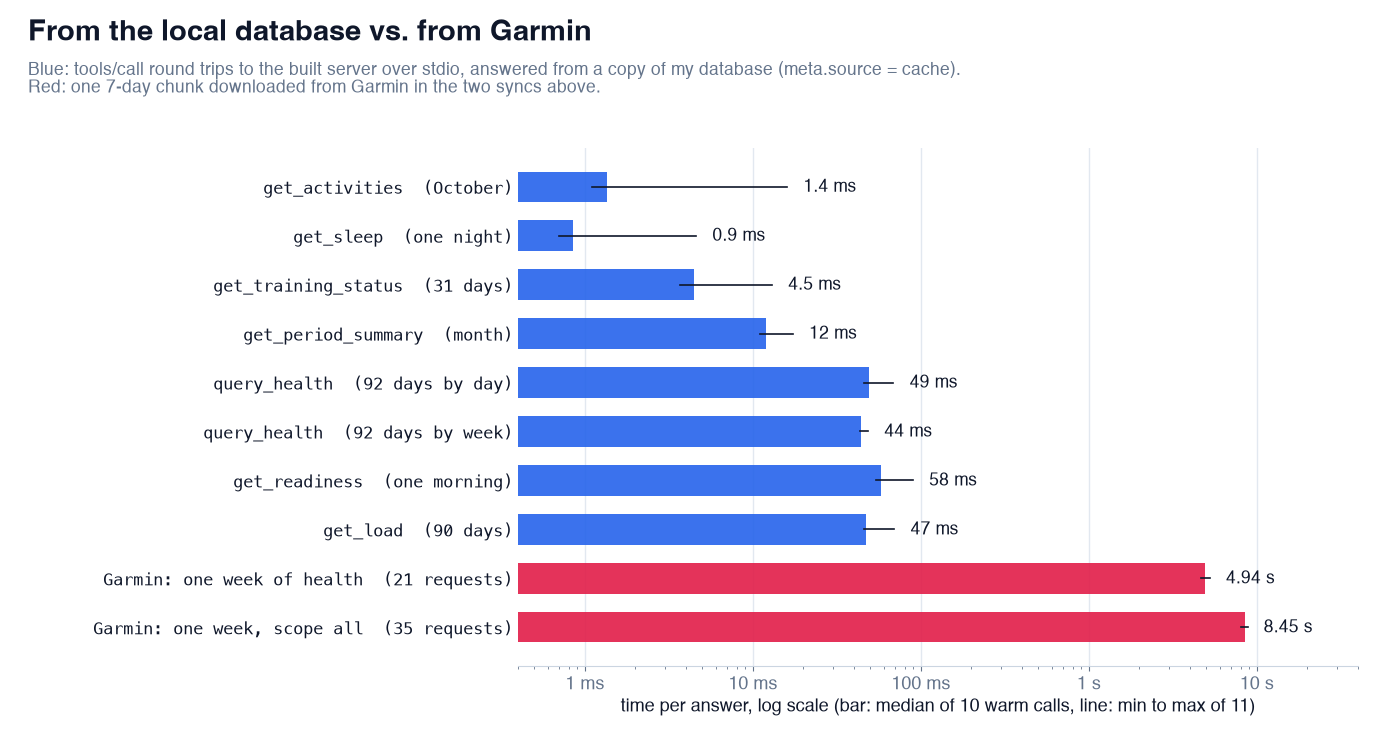
Medians of 10 warm calls per tool, with the first (cold) call included in the range. Garmin times are full 7-day chunks from the two syncs above.
Every call was answered from the cache in 0.7 to 90 ms, the first call after start included; the README's earlier 1 to 110 ms still holds. The slowest are the analytics tools, such as the morning readiness check, which compute baselines over weeks of data. (Readiness is training information, not medical advice.) The same week from Garmin takes about five seconds for health data alone, at full allowed pace.
You can see what the cache holds, and how much of today's budget is used, with one read-only command:
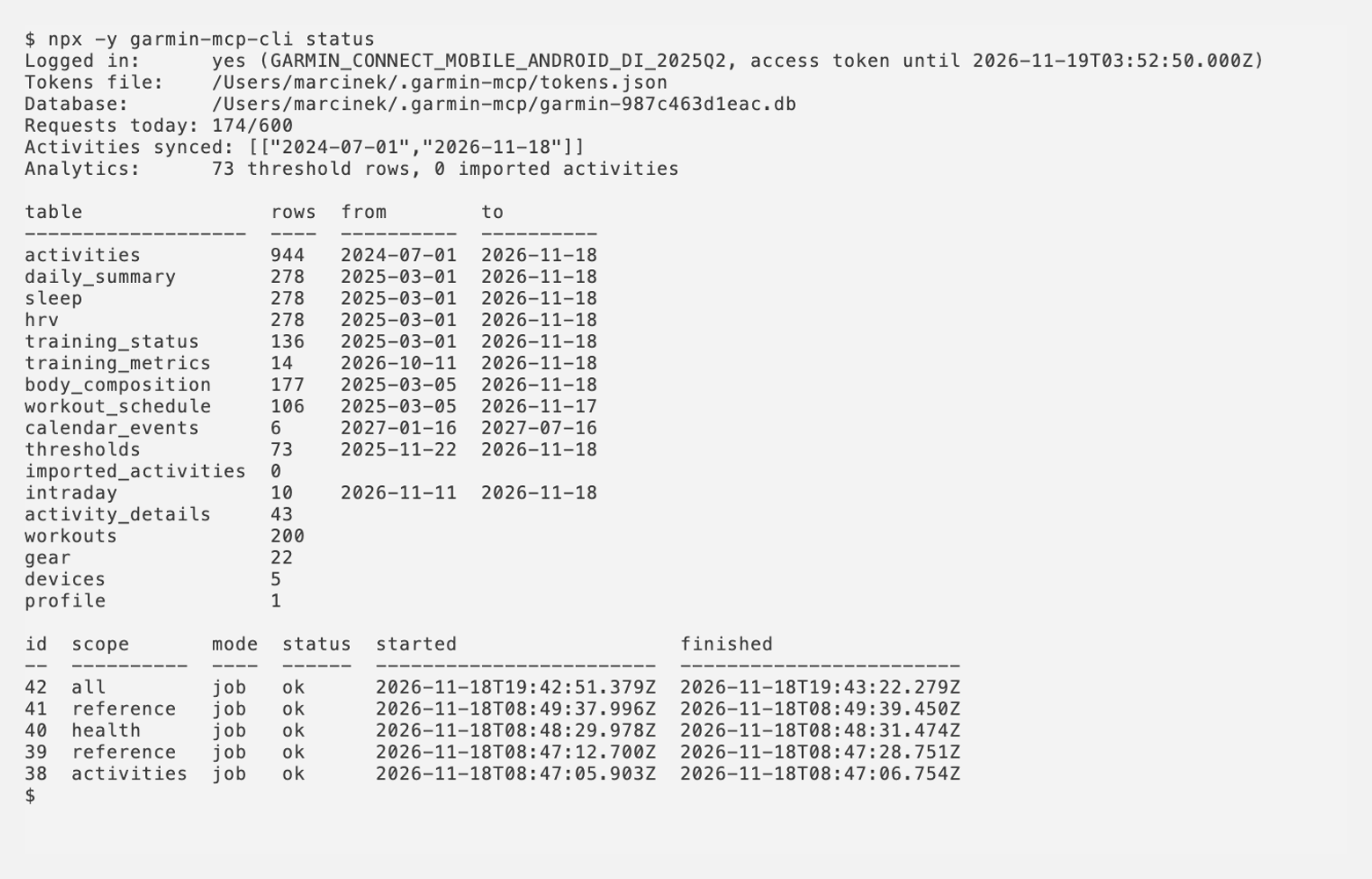
garmin status: counts and date ranges, never values.
A sign-in that never sees your password
Garmin's sign-in is built for its own website and app, with MFA and, sometimes, a CAPTCHA and a Cloudflare check. I did not want to ask for passwords at all. So garmin login opens Garmin's real sign-in page in your installed Chrome, Edge, Brave or Chromium, in a fresh temporary profile.
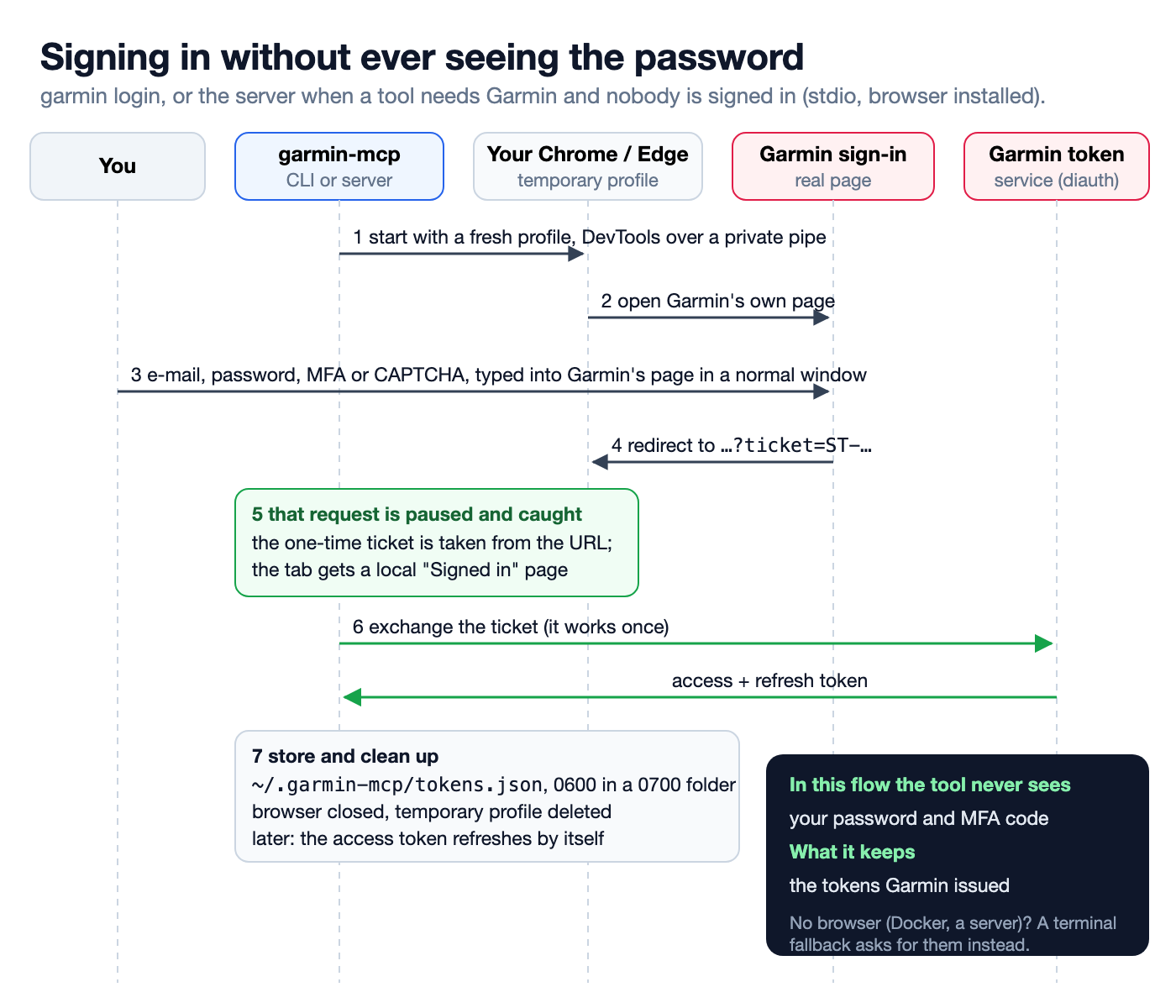
The tool waits for one URL. Everything before it happens between you and Garmin.
You sign in there like anywhere else, including MFA. The tool watches for one thing: the redirect to Garmin's service URL that carries a single-use ticket=ST-.... Through the Chrome DevTools Protocol it asks the browser to pause requests to that URL (Fetch.enable), takes the ticket from the paused request and answers it with a small local "Signed in" page, so the browser never spends the ticket. The tool then exchanges it for an access and a refresh token, writes them to ~/.garmin-mcp/tokens.json, closes the browser and deletes the profile. From then on, the access token refreshes itself.
Two details took the most time. DevTools runs over --remote-debugging-pipe, file descriptors only the parent process holds, rather than a localhost port that any other process on the machine could attach to during the five minutes the window may stay open. And the pipe flag turns on navigator.webdriver, which made Garmin's form answer 403 to a correct password. Starting the browser with --disable-blink-features=AutomationControlled fixed it; the person typing is not automation, and Cloudflare sees a real browser because it is one.
The MCP server uses the same flow. When a tool needs Garmin and nobody is signed in, it opens the window itself, waits up to 30 seconds, and otherwise tells the model the window is waiting and to ask again once you are done. Where there is no browser, in Docker or on a remote server, garmin login falls back to asking in the terminal and talking to the mobile login API. That path does see the password, once, and keeps only the tokens.
Files, permissions and the HTTP door
Everything lives in ~/.garmin-mcp: the tokens, a small account.json, and one database per Garmin account, named after a hash of the account so a second sign-in never mixes data. Files are 0600 inside a 0700 directory, including SQLite's -wal and -shm files. If something has looser permissions, the server refuses to start instead of fixing them silently; a health database readable by other users is a problem worth noticing.
The server also speaks streamable HTTP, for Docker or a home server. There it binds to 127.0.0.1 unless you give it a bearer token (GARMIN_MCP_HTTP_TOKEN), and refuses to start on another address without one. The token comparison is constant-time. Before the token is even checked, Host and Origin must be localhost, 127.0.0.1 or [::1], or a name you list in GARMIN_HTTP_ALLOWED_HOSTS; anything else gets 403. That stops a web page from reaching a local server through DNS rebinding.
Answers go only to the AI client you connected, and the rawest one has a filter: get_activity with detail: "full" returns Garmin's own JSON, and with GARMIN_REDACT=true (the default) leaves out the name, profile and photo URLs, device and sensor serial numbers and the GPS track.
If you are putting a cache in front of an API you do not control
- Make the cache the source of every answer, and the API a way to fill it.
- Download on the first question, not on install, and only the range that question needs.
- Have one way data comes in. Let reads report a gap and a single job fill it, so pacing lives in one place.
- Count every request against a daily budget stored next to the data, and back off for hours, not seconds, when the API says no.
- Return provenance with every answer: cache, live or partial, and what is still missing.
- Treat stored data as the checkpoint, so an interrupted sync resumes by doing nothing special.
- Measure your pacing on a real account. My first setting turned a 90-day sync into an hour, almost all of it waiting.
- If you can, let users sign in on the provider's own page and keep only the tokens.
The code is at https://github.com/endurancetools/garmin-mcp. The sync job is in packages/store/src/job.ts, the gates and pauses in packages/store/src/sync.ts, the browser sign-in in packages/auth/src/browser-login.ts, and the documentation, including what is stored where, at https://endurancetools.github.io/garmin-mcp/. To try it with Claude Code:
It talks to Garmin Connect's web endpoints, which Garmin can change, limit or block at any time. If you have wrapped an API like that, I would like to hear how you pace it.
Unofficial; not affiliated with or endorsed by Garmin.
Some illustrations in this article were generated with ChatGPT.
 Follow @marcin_running on Instagram